What problem it solves
Monolit keeps tickets, inventory, security alerts, UPS history, documentation, and the password vault in a single database. If the database is damaged or an update goes wrong, the entire history of the IT team is lost.
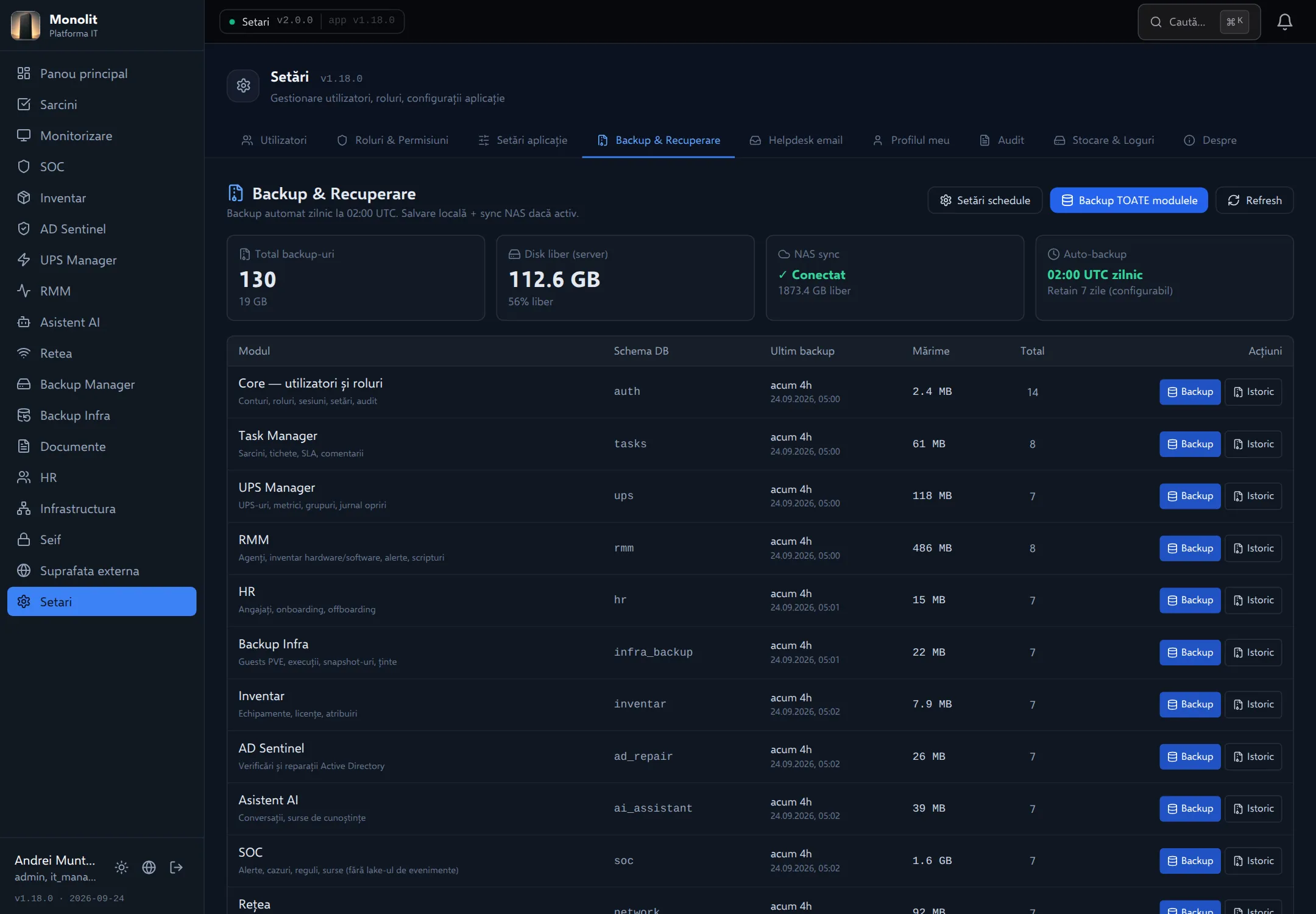
Backup & Recovery automatically saves the platform’s data on the chosen schedule (every night by default), separately for each module: from tickets and inventory to SOC alerts and the password vault. The newest modules (monitoring, external attack surface, and agent-based backup) are not in the list of modules it saves. Each copy can be verified and is kept locally and, optionally, on a NAS. A single module can be restored without affecting the others, and a restore either succeeds completely or changes nothing. The exception is the password vault: so that users’ keys are not broken, it is not restored module by module, only together with the whole database. That is why the vault needs a backup of the virtual machine, which Infrastructure Backup checks, or a backup of the database.
What it does in practice
- On the chosen schedule (daily by default), makes a backup of each module in its list (13 modules: users, tasks, UPS, RMM, SOC, network, documents, vault, and the other main modules), each one separately.
- Each copy has its own manifest, used to verify that it is complete and unchanged. A module’s data is saved consistently, from the same point in time; when that is not possible, the copy is flagged and an alert is sent.
- Copies the archives to a NAS share and verifies that each copy is identical to the original. A copy that did not reach the NAS is retried automatically and can also be retried manually.
- Keeps copies for the period set for each module. Even after several failures in a row, the last good copies of each module remain.
- Does not start a backup if there is not enough disk space, so that the server does not fill up.
- Allows an immediate backup of one module or of all modules, for example before an update.
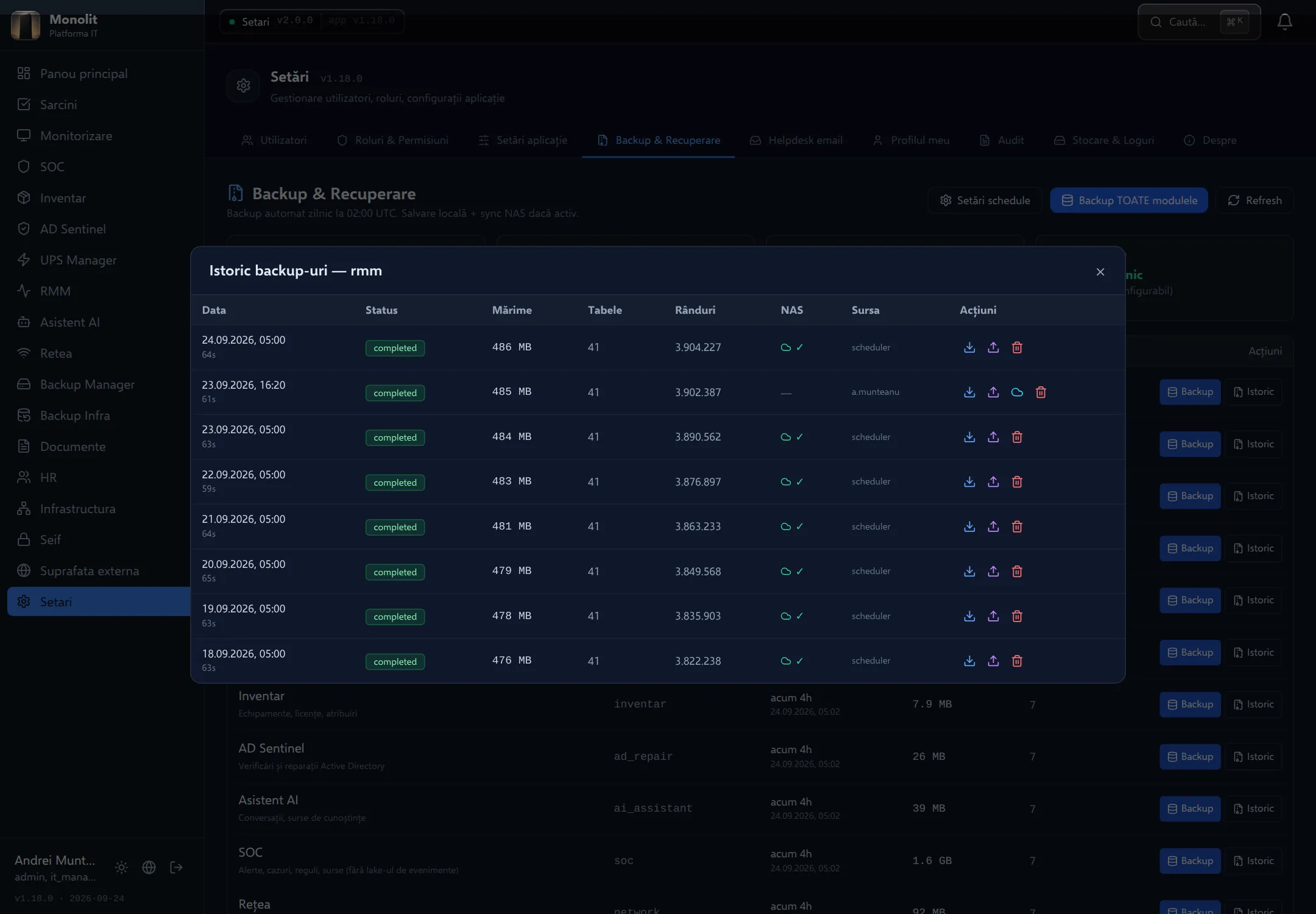
- Restores a module from a chosen copy: it first verifies the copy, always makes a safety copy of the current data, and replaces the data in a single step. If anything does not match, nothing changes.
- A restore does not bring back old passwords, disabled accounts, or commands left in a queue: accounts keep their current state, commands to workstations are canceled, and server shutdowns from a power outage are not replayed.
- A failed backup or a completed restore also appears as an alert in SOC. The status of the platform backup is used automatically as evidence in the NIS2 assessment in Documents → Compliance.
Workflows
1. Backup before an update
- The administrator opens Settings → Backup & Recovery.
- They click “Backup” on the module that is about to be updated. The copy appears immediately in the history, with its author.
- After the update, if something is wrong, the copy is available for a restore.
2. Restoring a module
- The desired copy is chosen from the module’s history, by date, size, and number of rows.
- The administrator stops only the module being restored on the server; the others keep running. The restore window shows which data will be replaced and asks for explicit confirmation.
- A safety copy of the current data is always made, verified, and kept separately. The restore can be undone from it.
- All checks run before anything changes, and the data is replaced in a single step.
- The result shows the tables and rows restored, or the reason for the refusal: in that case, nothing has changed. Recent restores remain visible, with their results.
3. The daily check
- The module table shows the last run, the size, and how many copies exist for each module.
- The cards at the top show the free space on the server and whether the NAS is connected.
Benefits and metrics
- The age of the latest backup for each module (target: under 24 hours).
- The percentage of copies synced and verified on the NAS.
- The free space on the Monolit server, also visible on the main dashboard, and the free space on the NAS, shown on the backup page.
- Restore time: a single module, without stopping the others.