Platform

Platform: users, roles, audit

A single sign-in with revocable sessions, shared roles, the account audit log, and a menu each person can customize, for all 17 modules.

Version
2.6.1
Stage
Stable
Screenshots
1
Replaces
Separate accounts and permissions in every tool
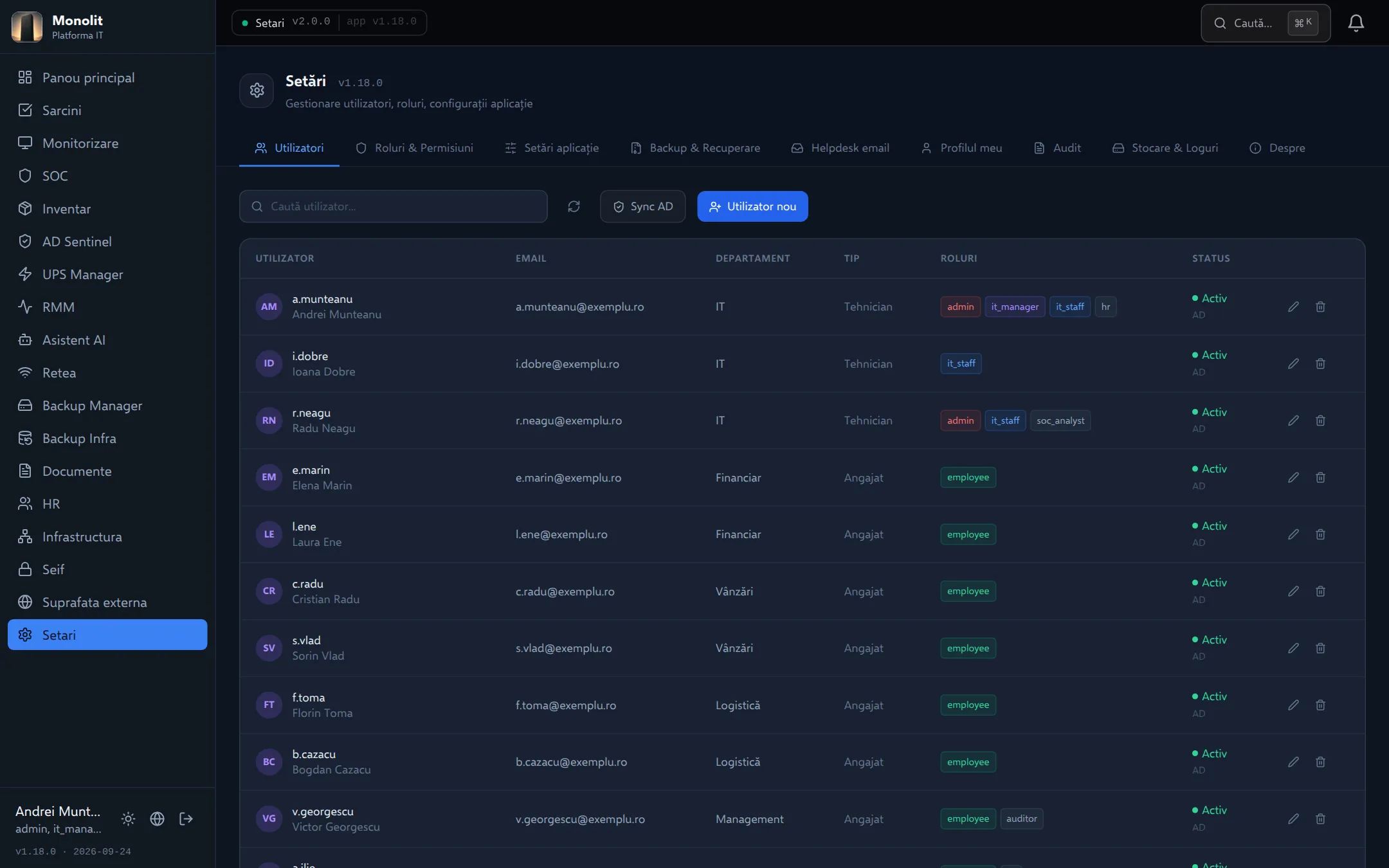
Users synced from Active Directory. The platform accounts, imported from AD, with department, type, and roles. Roles decide which modules each person sees and what they can do in them. The screenshot is older: the “soc_analyst” and “auditor” labels in the image are not platform roles; the platform has six fixed roles: administrator, IT manager, IT staff, HR, employee, and client.

Screenshots from the application

What it looks like at work

The real Monolit interface, with data from a fictional company on a typical day. The interface in the screenshots is in Romanian. Click a screenshot to see it at full size.

1Level 1

For leadership

What problem it solves, how the team works with the module, and what can be measured.

What problem it solves

Monolit has 17 modules: tickets, RMM, SOC, UPS, Vault, Monitoring, and others. Without a common core, each would have its own accounts, its own access rules, and its own history. Simple questions such as “who has access to what?” and “who changed this?” would be impossible to answer.

The platform core provides a single sign-in, accounts synced from Active Directory, roles shared by all modules, an audit log for accounts, and a menu that each person can customize. Backup of each module’s data has its own page: Backup & Recovery.

What it does in practice

  • Single sign-in for all modules, with one Monolit account. Accounts come from Active Directory or are created locally, and the Monolit password is separate from the domain password. Signing out, resetting the password, or disabling the account closes the sessions on all modules within seconds. Repeated password-guessing attempts are temporarily blocked.
  • Users from Active Directory: accounts are imported periodically or on demand, only over an encrypted connection, with the domain controller’s identity verified. An account disabled in AD is also disabled in Monolit. The sync does not remove manually assigned roles and does not reactivate an account disabled by HR or by an administrator.
  • Roles: six roles (administrator, IT manager, IT staff, HR, employee, client), enforced on the server, not just hidden from the menu. On the main dashboard, security telemetry (SOC, RMM, infrastructure backup protection, Active Directory, the live feed) is shown only to the IT team; other accounts see only general summaries, such as UPS units, tickets, the network, and storage. An IT manager cannot disable an administrator, and the last active administrator cannot be removed.
  • A customizable menu: the administrator or the IT manager sets the module order for the whole company and can hide unused modules; each person sets their own order from “Customize menu” and can collapse the sidebar to icons. Each person’s menu follows them to any computer. Hiding a module does not change access rights.
  • Light or dark theme, chosen by each person from the sidebar, on every screen. The SOC wall in the IT room, the attack map, and the rack views stay dark.
  • My profile: everyone sees their account details and changes their own password; the account’s other sessions are closed.
  • Audit log: successful, rejected, and blocked sign-ins, sign-outs, password changes, account creation and changes (roles, resets, deactivations), accounts changed by the AD sync, and changes to the default menu, with the time, the author, the affected account, and the IP address. It can be filtered by action and by account, and entries are kept for as long as the company decides.
  • Application settings and Roles & Permissions: read-only pages that show where email, Teams, sessions, Active Directory, and auditing are configured, and which modules each role sees.
  • About: the version of the application and of each module, with each module’s status and response time.

Workflows

1. A new employee

  1. The account is created in Active Directory.
  2. At the next sync, it appears in Monolit with the role that matches its AD group: IT staff for the IT team, employee for everyone else. The account becomes usable once the administrator sets a personal password, which the user can then change from My profile.
  3. If needed, IT adds extra roles (for example HR). The change goes into the audit log.

2. An employee leaves

  1. The account is disabled in AD.
  2. The sync marks it inactive in Monolit and closes its sessions on all modules.
  3. The history of their actions remains in the audit log.

3. A suspicious account

  1. The administrator filters the audit log by that account and sees the rejected sign-ins and lockouts, with the time and the address.
  2. They reset the password or disable the account; open sessions close within seconds, on all modules.
  3. The change stays in the log, with its author.

Benefits and metrics

  • One place to see who has access and with which role: the total number of users, how many are active, and how many come from AD.
  • Rejected sign-ins and lockouts per account, visible in the audit log.
  • The version and status of every module in a single table, useful for upgrades and troubleshooting.
  • A module that restarts no longer signs people out, and an update that fails to start reverts automatically to the previous version.

2Level 2

For the IT team

Integrations, requirements, roles, control, and known limitations.

Installation

  • All modules run on a company server: an Ubuntu Server virtual machine with a Microsoft SQL Server database. The interface opens in the browser, over HTTPS.
  • Resources: the minimum for the core modules is 6 vCPUs, 12 GB RAM, and 120 GB SSD. SOC needs more, especially storage for logs, sized according to network volume.
  • Each module runs separately: a problem or an update in one module does not stop the others.
  • Updates are installed with a tool that checks the module after it starts and reverts automatically to the previous version if the module does not start. Module settings are not overwritten during an update.
  • Backup of each module’s data: see Backup & Recovery.

Sessions

  • A single sign-in opens all modules. The session renews without the user noticing and expires a fixed period after sign-in, regardless of activity.
  • If a copied session is renewed by someone else, Monolit recognizes it at the next renewal and closes it.
  • Signing out, password resets, deactivation, and role changes take effect on all modules within seconds.
  • A module restart or a brief network interruption does not sign people out of the application. Credentials do not appear in page URLs or in server logs.

Active Directory

  • AD sync runs periodically, at the chosen interval, or on demand, from the “Sync AD” button. It works only over an encrypted connection, with the domain controller’s identity verified against the company’s certificate authority; an unencrypted connection is refused, with the reason in the audit log.
  • Configuration covers the domain controller, the internal certificate authority’s certificate, and the AD groups for the IT team and for employees. The IT team group gets the IT staff role, and everyone else gets the employee role.
  • An imported account cannot be used until an administrator sets a personal password for it.
  • The sync does not link an AD account to a privileged local account, does not reactivate accounts disabled by a person, and does not disable accounts based on an incomplete read from AD. Every changed account and the summary of every sync go into the audit log.

Menu and module access

  • Roles decide which modules each account can see, and operational modules are protected even when their URL is opened directly. The company’s default menu and the personal menu are applied on top of the roles; a hidden module remains reachable from Ctrl+K search.

Roles and audit

  • Managing users requires an administrator or the IT manager. The HR role can only create employee or client accounts and edit or disable regular accounts, without changing roles or passwords, for HR hires and departures. Permissions are checked on the server for every action, based on the account’s current state, and the reason for a refusal is shown in the interface. The default menu and the audit log are for administrators and the IT manager; the “Storage & Logs” tab is for administrators only.
  • Roles are fixed; Roles & Permissions shows which modules each role sees.
  • The audit log covers sign-ins, passwords, accounts, AD sync, and the default menu. An account change is not saved without its audit entry, and a problem writing to the audit log never blocks sign-in. The log contains no passwords. The retention period is configurable.
  • Changing your own password requires the current password and is protected against repeated attempts in the same way as sign-in. Profile details cannot be edited in the application, because the email address links the account to AD and to the HR record.
  • Sensitive modules (for example Vault and External attack surface) keep their own audit log.

Limitations

  • Signing in with the domain password is not available: sign-in uses the Monolit password.
  • Automatic mapping from AD covers only two roles (IT staff and employee). The other roles are assigned manually.
  • Which modules each role sees is defined in the application and cannot be configured from the interface.
  • Email and Teams are configured separately, in each module that sends notifications; there is no central configuration.