Security

External attack surface

The company as seen from the Internet, the way an attacker sees it: domains, subdomains, email, exposed ports.

Version
0.3.0
Stage
Pilot
Screenshots
4
Replaces
Commercial EASM services
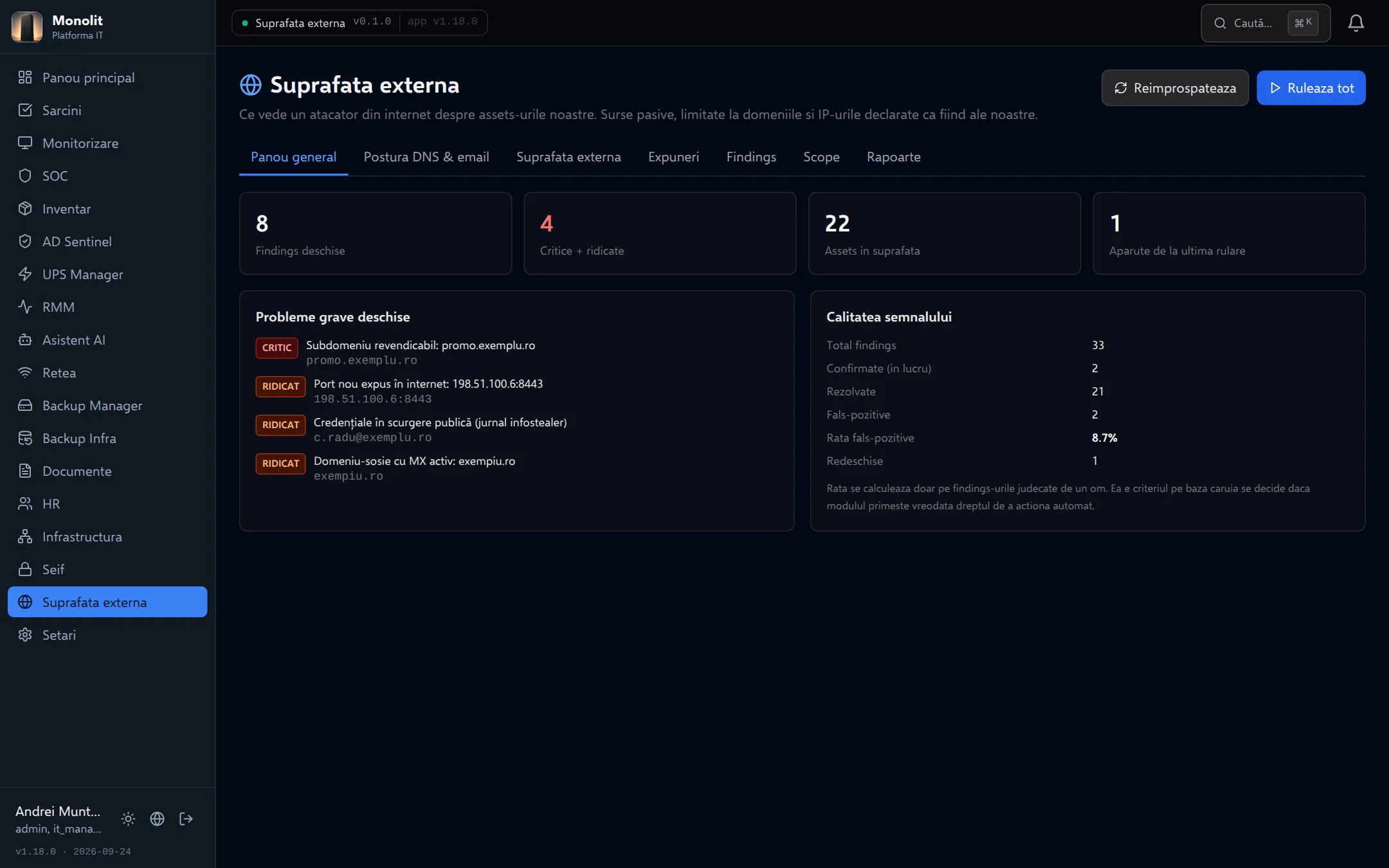
Overview. Today’s run: 8 open findings, 4 of them critical or high, 22 items visible from the Internet, and one new since yesterday. On the right, the signal quality: the false-positive rate on closed findings.

Screenshots from the application

What it looks like at work

The real Monolit interface, with data from a fictional company on a typical day. The interface in the screenshots is in Romanian. Click a screenshot to see it at full size.

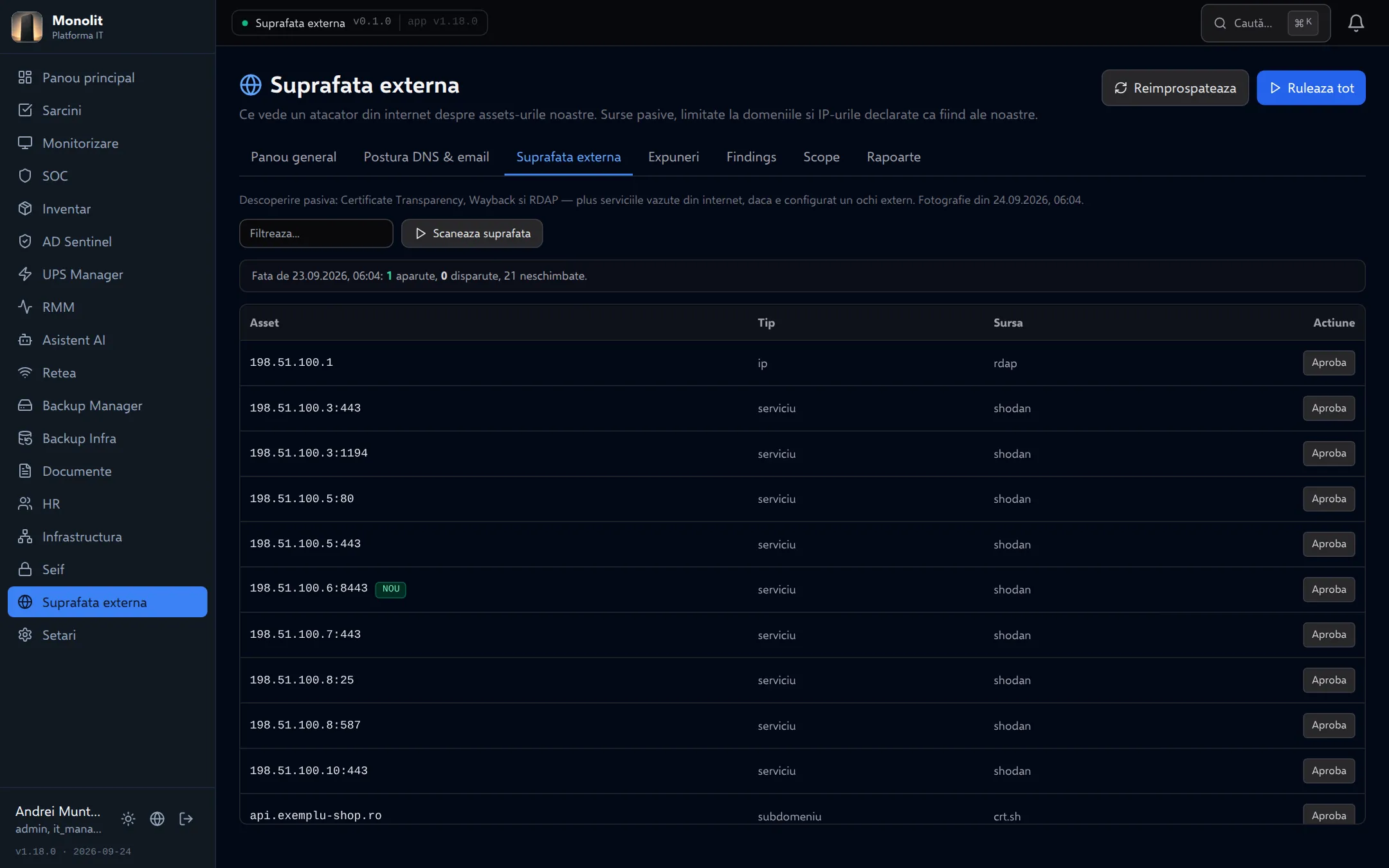
The external surface and what changed since yesterday. The inventory for exemplu.ro, exemplu-shop.ro, and the public IP addresses explicitly declared in scope: services, subdomains, and the source in which each one was found. Port 198.51.100.6:8443 is marked NEW (NOU): it was not there in yesterday’s run.
Screenshot 2 of 4

The external surface and what changed since yesterday

The inventory for exemplu.ro, exemplu-shop.ro, and the public IP addresses explicitly declared in scope: services, subdomains, and the source in which each one was found. Port 198.51.100.6:8443 is marked NEW (NOU): it was not there in yesterday’s run.

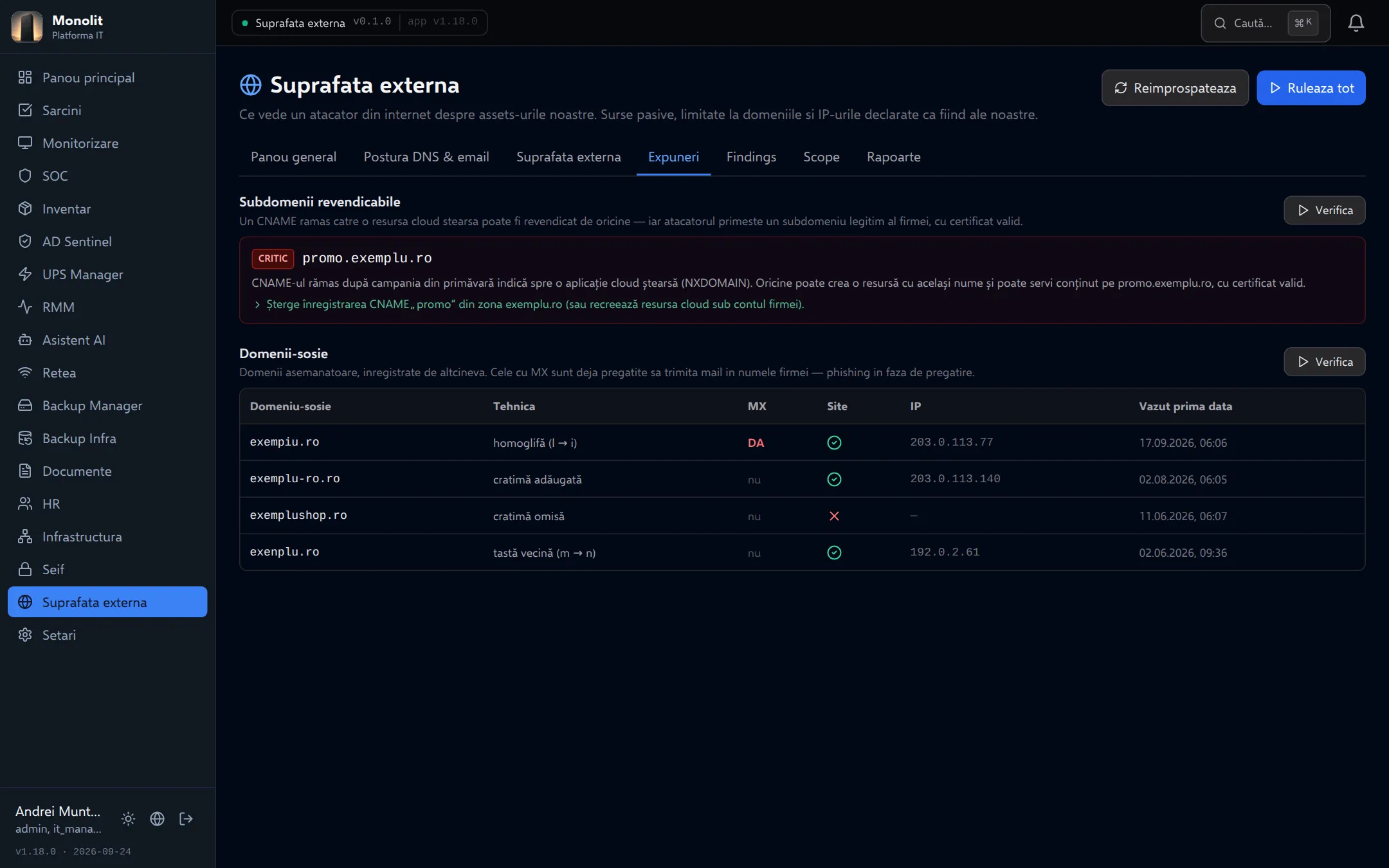
Claimable subdomains and lookalike domains. A subdomain of the fictional company points to a deleted cloud application and can be taken over by anyone: a critical finding, with the remediation next to it. Below are the domains that imitate the company; one already has a mail server, so it is ready for phishing.
Screenshot 3 of 4

Claimable subdomains and lookalike domains

A subdomain of the fictional company points to a deleted cloud application and can be taken over by anyone: a critical finding, with the remediation next to it. Below are the domains that imitate the company; one already has a mail server, so it is ready for phishing.

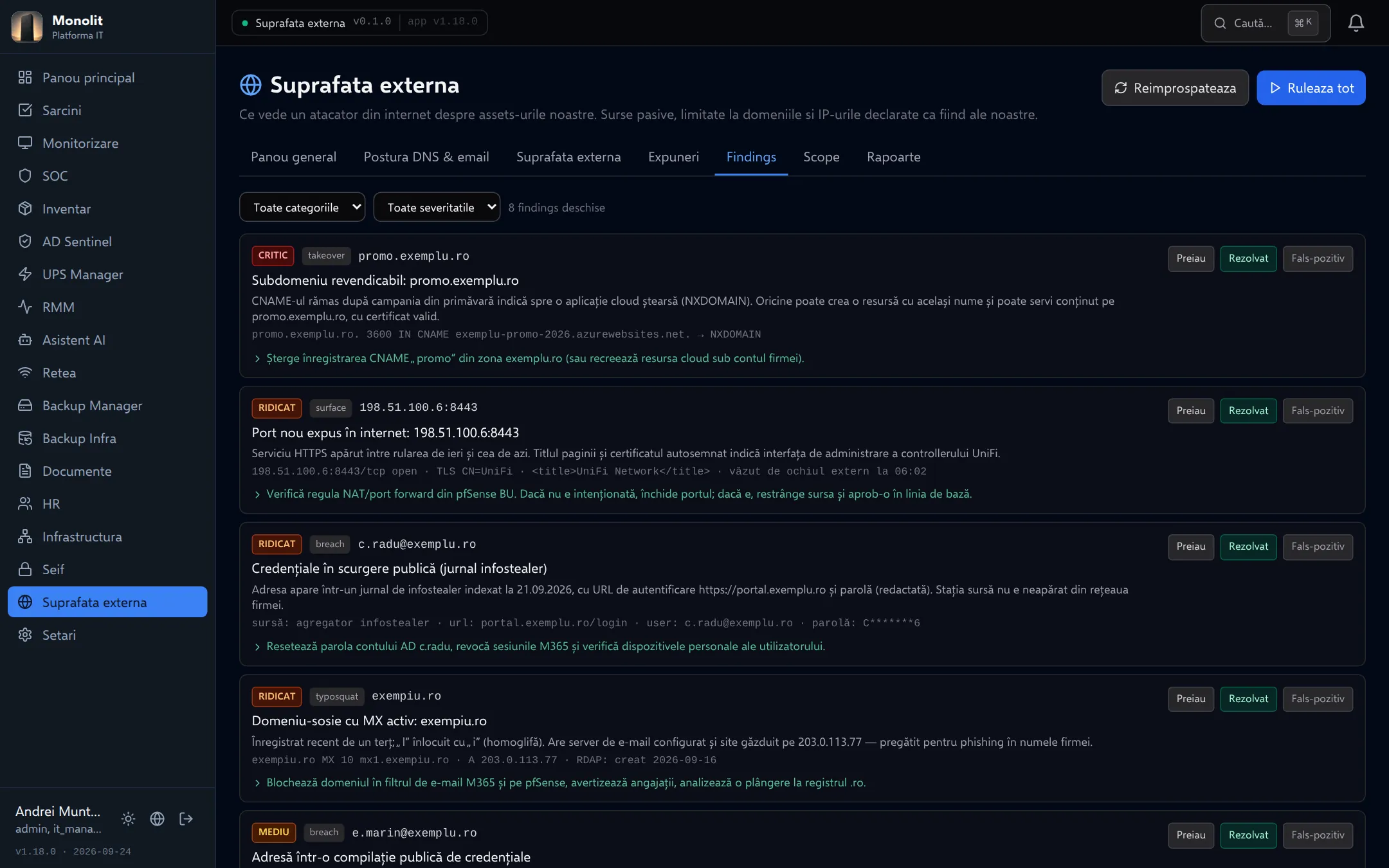
Findings with evidence and remediation. Each finding has its category, the technical evidence, the remediation steps, and the “Take ownership” (Preiau), “Resolved” (Rezolvat), and “False positive” (Fals-pozitiv) buttons. The module fixes nothing on its own: the decision stays with the IT team and counts in the quality statistics.
Screenshot 4 of 4

Findings with evidence and remediation

Each finding has its category, the technical evidence, the remediation steps, and the “Take ownership” (Preiau), “Resolved” (Rezolvat), and “False positive” (Fals-pozitiv) buttons. The module fixes nothing on its own: the decision stays with the IT team and counts in the quality statistics.

1Level 1

For leadership

What problem it solves, how the team works with the module, and what can be measured.

What problem it solves

An attacker starts with what is visible from the Internet: subdomains forgotten after a campaign, ports opened by mistake, email settings that allow the sender to be forged, domains registered to look like the company’s own, employee passwords exposed in public leaks. Usually nobody tracks these things until the first incident.

The module regularly checks, from the outside, only what has been declared as belonging to the company. The result is a list of findings, each with evidence and remediation steps. The module is still at the pilot stage.

What it does in practice

  • DNS and email posture: checks SPF, DMARC, DKIM, CAA, and DNSSEC on every declared domain. A check that DNS did not answer shows as “don’t know”, not as “missing”: a network outage neither produces false alarms nor closes real issues.
  • The domain’s name servers and mail servers: tracks who answers for the domain and where its email goes. Flags a change of name servers or mail servers that nobody approved, a mismatch between what the registrar lists and what the domain serves (this is what a hijacking looks like), broken DNSSEC, which makes the domain unreachable for part of the Internet, and a name server that no longer responds. A change is confirmed before it becomes a finding, so an update in progress does not wake anyone up.
  • The certificate served by the company’s websites: checks the certificate that visitors actually receive and flags in advance an approaching expiry, a certificate issued for a different name, and an issuer the domain does not allow. The measurement is made from the company network, and the finding says so.
  • External surface: passively discovers, from public sources, the company’s subdomains and services. If an “outside view” (Shodan or Censys) is connected, it also sees open ports the way the Internet sees them.
  • Differences between runs: each run saves a snapshot of the surface. What appeared or disappeared since the previous run is marked. Known items are approved into the baseline so they stop generating noise.
  • Exploitable exposures: subdomains that someone else could take over (they point to a deleted cloud resource) and lookalike domains registered by third parties, highlighting those that already have a mail server.
  • Leaked secrets and credentials: looks for credentials that have appeared in public leaks on the company’s email domains and for secrets exposed in explicitly specified targets, with redacted evidence.
  • Shadow IT: compares what is visible from the Internet with the IT inventory, the workstations in RMM, and the devices in Network. Anything exposed that does not belong to any internal system becomes a finding.
  • Findings with severity, evidence, and remediation. For each one, someone takes ownership, then resolves it or marks it as a false positive. Critical and high findings also go into the SOC alert stream, one alert per finding.
  • PDF report with the DNS posture, the current surface, the difference from the previous run, and the open issues, for the ISO 27001 / NIS2 audit file.
  • Compliance evidence: when the module is running, the SPF and DMARC posture is automatically fed into the NIS2 assessment in the Documents module. A domain without SPF or with DMARC only in monitoring mode is named as an issue.

Three rules are fixed:

  • The module touches nothing outside the declared list (Scope). The list rejects obvious values that would extend it beyond the company: public suffixes under which anyone can register a domain, internal names, private addresses, and address ranges that are too broad.
  • Checks through third-party services that require an account (credential leaks through HudsonRock, Shodan, Censys) are turned off at installation. The IT team turns them on as an explicit decision. Public sources receive only the domain names in Scope, and requests do not identify themselves with the name of the company or of the platform (identification is generic).
  • The module does not perform any remediation. People decide.

Workflows

1. Getting started

  1. An administrator or IT manager adds the company’s domains (marking which ones send email) and its public IP addresses to Scope, one by one.
  2. They click “Run all”. The run starts in the background and checks DNS, the surface, exposures, lookalike domains, leaks (if enabled), and shadow IT. Progress is shown in the run history.
  3. The overview panel shows the open findings by severity.

2. Morning triage (with the outside view on)

  1. The overnight run finds a newly opened port on one of the company’s public IPs.
  2. The finding appears as “high”, with the evidence (the service and the certificate seen from outside).
  3. The technician takes ownership of it (“Take ownership”), checks the firewall rule, and closes the port. If the exposure is intentional, an IT manager can approve the address into the baseline so it no longer shows as new in the difference between runs. The approval does not close the port finding.
  4. The IT manager marks the finding as “Resolved”. If the issue reappears in a later run, the finding is reopened and the counter shows it.

3. The domain’s name servers have changed

  1. The periodic check sees name servers other than the known ones, and a later check confirms the change.
  2. The finding appears as “high” and goes to SOC. The evidence shows the known servers and the current ones.
  3. IT finds out where the change comes from: a planned migration to another DNS provider or a compromised registrar account.
  4. If it is legitimate, an IT manager approves it into the baseline (for now through the API, without a button in the interface), and the finding closes at the next check. If not, the registrar account password is changed, MFA is checked, and the correct servers are restored.

4. Employee accounts appear in a public leak (if leak checking is on)

  1. The finding, with “high” severity, shows the domain, how many employee accounts appear in the logs of a data-stealing program (infostealer), the source, the date of the last reported compromise, and a partial, redacted list of the applications involved. Monolit does not keep the affected addresses: exactly who is affected is visible in the source’s console.
  2. IT manually resets the account password and revokes its sessions. The module does not do this automatically.
  3. The finding is closed after confirmation.

Benefits and metrics

  • Open findings by severity, and the number of critical or high ones.
  • The number of items exposed on the Internet and how many have appeared since the last run.
  • The false-positive rate, measured on closed findings. It will be the basis for deciding whether the module is ever allowed to act automatically. That is why closing a finding (resolved or false positive) is reserved for administrators and the IT manager.
  • Reopened findings: issues marked resolved that have reappeared.
  • Run history: when each check ran, with what result (complete, partial, failed), and who triggered it.

2Level 2

For the IT team

Integrations, requirements, roles, control, and known limitations.

Where it runs

  • It runs on the company’s Monolit server, like the rest of the platform, and connects to the Internet only to reach public sources, the name servers and websites in Scope, and third-party services that have been explicitly turned on.
  • Scope is an allowlist of domains, public IP addresses, and small address ranges. A domain also covers its subdomains and can be marked as an email domain. Values that would reach outside the company are rejected when added, and an older value that no longer passes validation is ignored.
  • A full run covers all checks. A failed step does not stop the run: it ends as “partial”, with the reason. Name servers and served certificates are checked more often.
  • Checks run automatically, daily or several times a day, and on demand. A manually requested check does not overlap with an automatic one already in progress, so findings are not duplicated. The history of the surface is kept, for comparisons and audits.

Integrations

  • Public sources: published certificates, web archives, domain registries, and public DNS, queried only about the domains in Scope.
  • DNS: “missing” is stated only on a clear answer. A query left unanswered gives “don’t know”, produces no findings, and closes nothing; the run ends as “partial”.
  • Name servers and mail servers: Monolit flags an unapproved change and a mismatch that may mean a domain hijacking, querying only public addresses. A person approves a legitimate change. The first check after the module starts becomes the reference, so at installation the IT team checks the name servers and mail servers that were found. If none of the domain’s servers responds, no conclusion is drawn: the cause may be the company’s own Internet link.
  • Served certificates: the domains in Scope, their www variant, and the hosts approved in the baseline are checked, so that expired or wrong certificates are found. Severity increases as expiry approaches. A name that resolves on the internal network is measured from the inside, and the finding says so. At expiry, Monolit also shows whether a newer certificate has already been issued but not installed.
  • Direct checks on the company’s websites stay within Scope: a resource taken over by someone else cannot send the module toward the internal network.
  • Optional outside view: Shodan or Censys (API key), for IP addresses declared one by one. Without it, the module runs normally but does not see exposed services the way the Internet sees them.
  • Leaked credentials: optional HudsonRock source, off by default because it sends the email domains to a third-party service. Only domains marked as email domains are checked.
  • Inventory, RMM, and Network: anything exposed that does not belong to any internal system becomes a shadow IT finding. If an internal source does not respond, shadow IT findings are not closed automatically, and the step warns that false positives may appear; without any of the three sources, the step produces no findings.
  • SOC: critical and high findings, new or reopened, become SOC alerts, one per finding, and so does an open finding that becomes more severe (for example a certificate getting ever closer to expiry). SOC uses the email posture to suggest external dependencies (Microsoft 365, Google Workspace), which a person confirms, and the Scope list, so that the company’s domains and addresses are not sent to third parties.
  • Documents: the SPF and DMARC posture automatically feeds the NIS2 requirement on authenticated email, together with the certificates tracked in RMM. A domain that was only partially read is not taken as “no SPF”. If EASM does not respond, the requirement is left without an automatic verdict, with a note.

Roles and audit

  • The module is for the IT team only (administrators, the IT manager, and IT staff).
  • Reading a finding and taking ownership of it (“Take ownership”) are open to the whole IT team.
  • Changing Scope, any scan, approval into the baseline, a full run, reading the audit, and closing a finding (resolved or false positive) are reserved for administrators and the IT manager. The interface disables these buttons for other accounts.
  • The evidence of a secret-type finding (the masked fragments and the exact location) is visible only to administrators and the IT manager.
  • The audit records every call to an external source, every target rejected because it is not in Scope, and every action in the interface, the latter with the account and IP address.
  • Taking ownership and marking as a false positive remain a person’s decision. An email / DNS, claimable subdomain, lookalike domain, certificate, or shadow IT finding that no longer appears closes itself as resolved, marked “auto”, but only after a check completed without errors. It reopens if it reappears. A domain or host that could not be read keeps its findings. Surface findings (ports, services), secret findings, and leak findings do not close on their own. All of them count toward the quality statistics.

Secrets

  • The target can be an address in Scope or a local directory, from a list of allowed directories set by the IT team. The list is empty at installation, so local scanning is off, and system directories and the application’s own directory are always rejected.
  • The value of a secret is never saved anywhere: the evidence shows only the type of secret, a masked fragment, and where it was found.

Requirements

  • Outbound Internet access: to public sources, to public DNS servers and the servers of the company’s domains, and to the company’s own websites, plus, if turned on, to Shodan, Censys, or HudsonRock.
  • A completed Scope list. Without it, the scan buttons are disabled on purpose, and the module makes no external calls.
  • The report downloads as a PDF, with no external resources; if the server does not have the PDF generation component, it downloads as HTML.
  • Installation and updates are done with the module’s script, which verifies the package before installing, downloads nothing from the Internet, and automatically rolls back to the previous version if startup fails.

Limitations

  • Pilot module.
  • Checking name servers and served certificates does not yet have its own interface: findings appear in the general list, but on-demand checks, the last check of the name servers and mail servers, and approving a change are done through the API for now.
  • Certificates are checked only on the standard HTTPS port and only over IPv4, and a name server that has only an IPv6 address stays “not read”. The certificate is the one seen from the company network: from the Internet it may be a different one.
  • The interface shows open and owned findings. Resolved and false-positive findings appear only in the statistics.
  • Secret scanning does not yet have a button in the interface.
  • The outside view does not query the address ranges in Scope, so as not to use up the API quota in a single run. Addresses to monitor are declared one by one, and a range makes the step show as “partial”, with the reason.
  • While leak checking is off, a full run shows as “partial” in the history, with the reason. The other categories are checked and closed normally.
  • Resetting the password of an account found in a leak remains manual.
  • Findings are not sent to the local AI.