IT & security platform · on-premises

All your company’s IT, in one monolith.

Monolit brings the helpdesk, workstation and application monitoring, the network, inventory, UPS units, Active Directory, backup, compliance, and security together in a single platform that runs on the company’s own server. Leadership sees the real state of IT on one screen. The IT team works in one place, not in ten consoles.

17integrated modules, from helpdesk to SOC
20+connected systems: pfSense, Snort, UniFi, Proxmox, AD, GravityZone, Veeam…
1server of your own. Your data stays in-house
AIrunning locally, with human approval for any sensitive action
Leadership dashboard · sample dataBased on the real interface, with labels translated · light and dark themes

The problem

The real cost of scattered IT doesn’t show up on any invoice.

It shows up on Monday morning, after a power outage. It shows up when a key person leaves. It shows up at the audit. Five situations every company with 30–250 workstations goes through, today and with Monolit:

Saturday, 2:20 PM

The power goes out at the main office

Today

The UPS lasts as long as it lasts. When the battery runs out, the servers shut down abruptly. Monday: databases to check, corrupted virtual machines, hours of restoring.

With Monolit

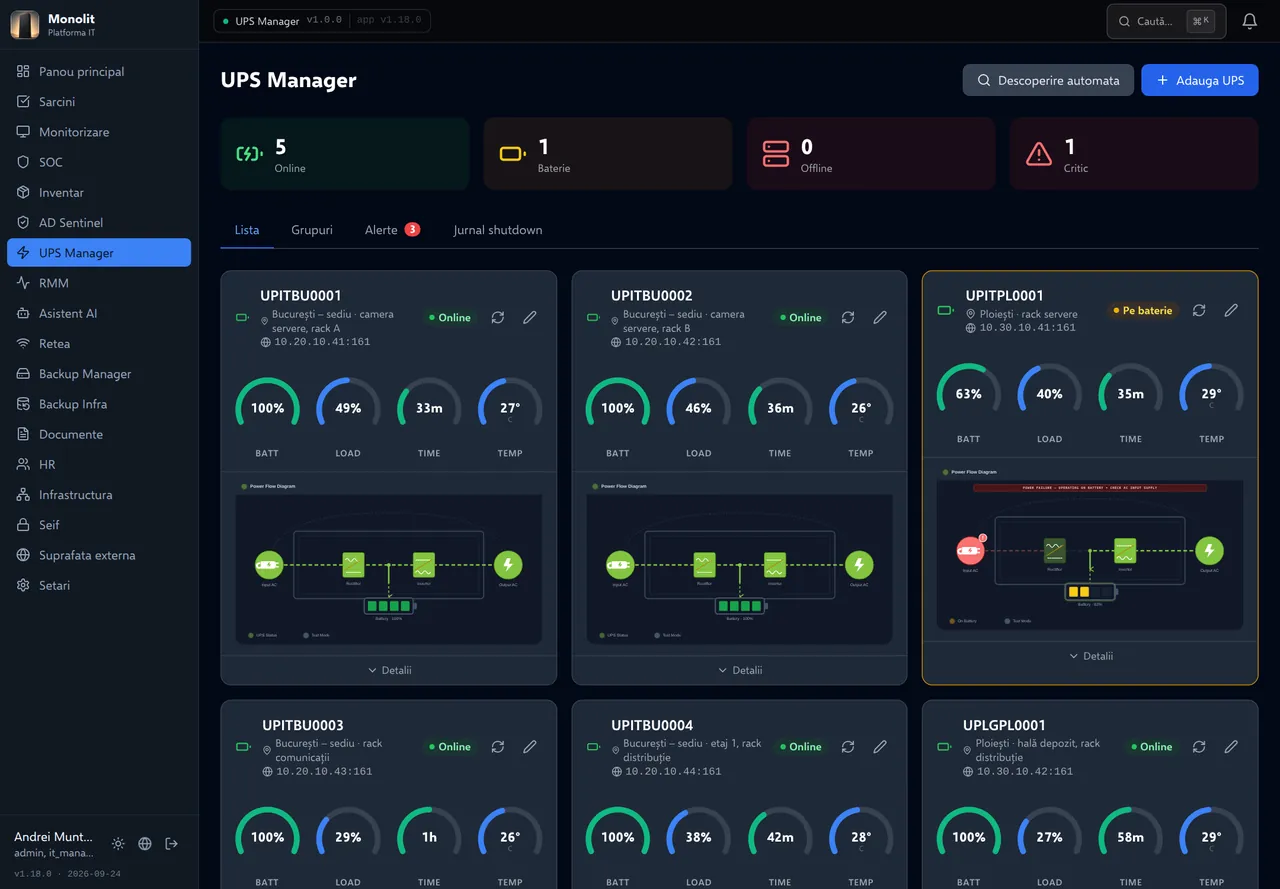
The switch to battery is detected quickly. The team gets a notification, and the servers, VMs, NAS, and hypervisor shut down gracefully, in the order you set. When power returns, the selected servers start up again automatically.

UPS Manager
Last working day

An employee leaves the company

Today

The laptop stays in a drawer, the domain account stays active, the shared passwords don’t get changed. Nobody has the complete list of what needs to be returned.

With Monolit

The offboarding workflow shows the inventory equipment assigned to the employee, generates the equipment return report, and automatically creates the IT task to disable the accounts. The offboarding can’t be closed until access revocation is confirmed, and “unreturned equipment” stays on the HR dashboard until it is resolved.

HR · Inventory · Task Manager
Tuesday, 10:05 AM

A workstation starts encrypting files

Today

It gets noticed when colleagues can no longer open the documents on the file share. By then, the encryption has spread across the whole shared folder.

With Monolit

The agent has its own anti-ransomware protection. At the first sign, an alert appears on the IT team’s screen, with the workstation, the user, and its history, next to the antivirus alerts.

RMM · SOC
A letter from the auditor

NIS2 or ISO 27001 call for evidence

Today

Entire days of exports from six consoles and Excel spreadsheets rebuilt by hand. The evidence shows today’s state, not the history.

With Monolit

A compliance score for NIS2, ISO 27001, GDPR, and CIS, with the evidence for each requirement and a plan for what is still left to do. Plus executive and ISO 27001 PDF reports from real data: patches, backup, incidents, audit log, a daily score for each workstation.

Documents · RMM · Infrastructure Backup · SOC
Thursday, 2:00 PM

The Internet has been slow for hours

Today

The provider says everything is fine on their end. The IT team has no evidence: not when it started, not how long it lasted, not whether the problem is at the company, at the provider, or further out on the Internet.

With Monolit

The Connections tab shows the episode, with its start, duration, latency, and packet loss, and whether the other links were working at the same time. The probes tell whether the problem is on the line, at the provider, or further out. The IT manager downloads the report for the provider, as a PDF with verifiable CSV tables. The report uses a conservative method that is hard to dispute, and it explicitly states what it does not prove.

SOC (Connections tab)
Five vendors, five contracts

RMM, helpdesk, log collection, password manager, and UPS software, each with its own contract, accounts, and rules. A new person on the team means accounts created by hand in several places.

Information split across ten consoles

Nobody sees the full picture. The monthly report for leadership is put together by hand, from screenshots.

Alerts discovered too late

The firewall, the antivirus, and the Wi-Fi each report separately. Signals that, pieced together, would reveal an attack go unnoticed.

Dependence on key people

The procedures for repairing the domain or shutting down the servers exist only in one person’s memory.

Personal liability for leadership

Under NIS2, management approves the security measures and is accountable for them. Without evidence, leadership cannot show it has met that duty.

Sensitive data in someone else’s cloud

Logs, inventory, and passwords end up with external providers, under contracts, jurisdictions, and exit costs you don’t control.

The platform

A single platform, on the company’s own server.

Monolit collects what your existing equipment already reports, puts it into a common model, and delivers it to each person in the form they need: figures for leadership, actions for IT, and a simple portal for employees.

What you already have

  • Windows and Linux workstations and servers (Monolit agent)
  • pfSense, Snort, pfBlockerNG, ntopng, NetFlow
  • UniFi: switches, APs, clients
  • Proxmox VE, Proxmox Backup Server, TrueNAS, S3
  • Active Directory and the domain controllers
  • UPS units via SNMPv3 or NUT
  • Bitdefender GravityZone, Veeam, Wazuh (optional)

Monolit · 1 Ubuntu VM, on the company network

  • 17 independent modules, enabled and updated separately; the interface opens over HTTPS
  • SQL Server database and real-time notifications
  • Roles: administrator, IT manager, IT staff, HR, employee, client
  • Local AI for explanations, summaries, and log analysis
  • Audit log for accounts and sensitive actions, with the user and the time (for accounts, also the IP address)
helpdeskrmminventoryupsmonitoringnetworkadsocaieasmvaultbackuphrdocs

Who uses it

  • Leadership: dashboard, executive reports, the NIS2 and ISO 27001 compliance score
  • The IT manager: SLA, compliance, approval of sensitive actions
  • The IT team: tickets, scripts, patches, runbooks, explained alerts
  • HR: onboarding and offboarding, with equipment and documents
  • Employees: ticket portal and password vault
Platform: users, roles, audit2.6 · Stable

Sign-in with revocable sessions, roles, an account audit log, the leadership dashboard, a menu each person can customize, light or dark theme, global search, real-time notifications.

Helpdesk & Task Manager2.5 · Stable

Tickets from the portal and email, P1–P4 SLAs, team queues, knowledge base, recurring tasks, tasks created automatically by HR, and, with one click, from the compliance plan.

RMM1.21 · Stable

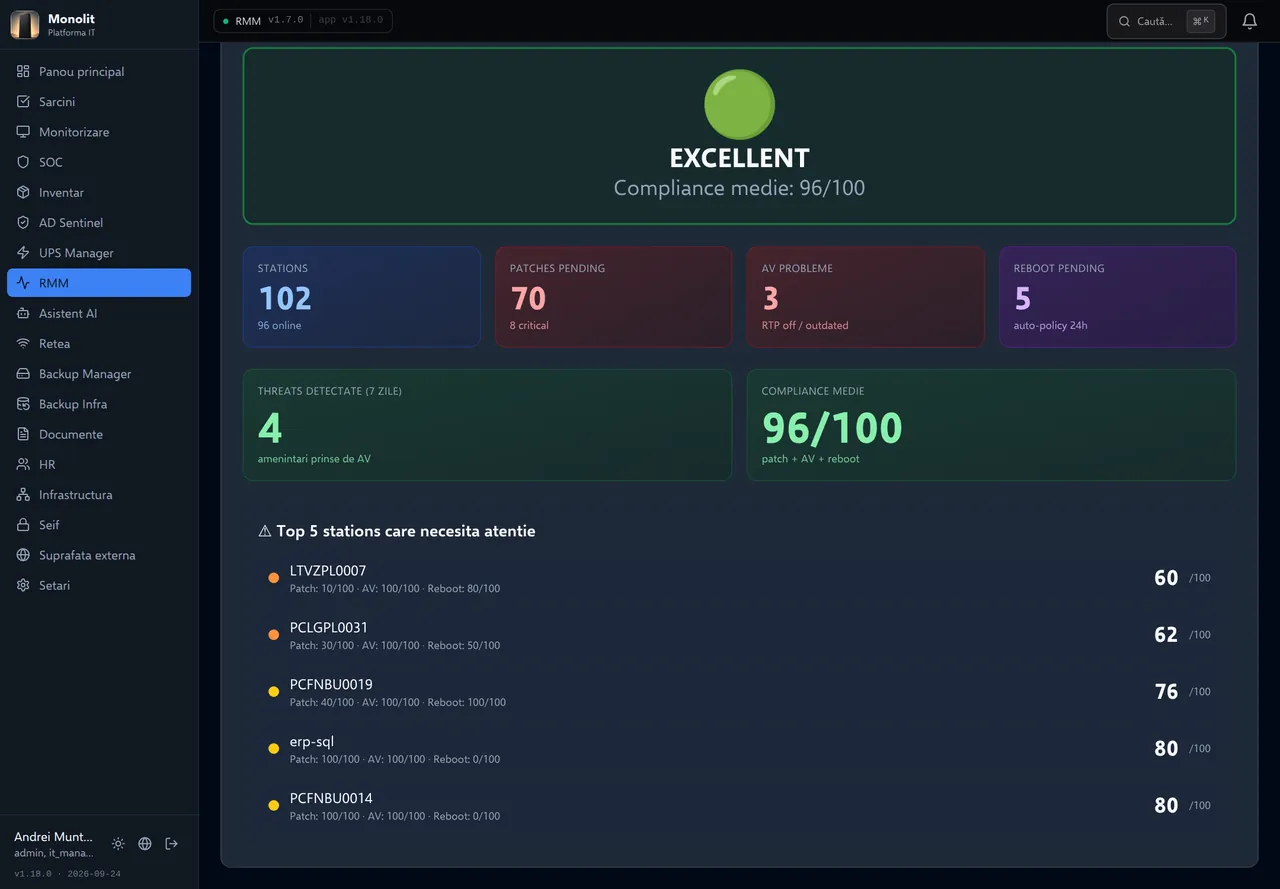
Agent on workstations and servers, signed on Windows: telemetry, patches, antivirus, scripts, remote control, logs explained by AI, compliance, reports.

Inventory1.1 · Stable

All equipment, each item with its own unique asset tag: network scanning, UniFi sync, rack position, warranties, and QR labels.

UPS Manager1.2 · Stable

UPS units via SNMPv3 or NUT, graceful server shutdown based on the remaining runtime, startup when power returns.

Network1.6 · Stable

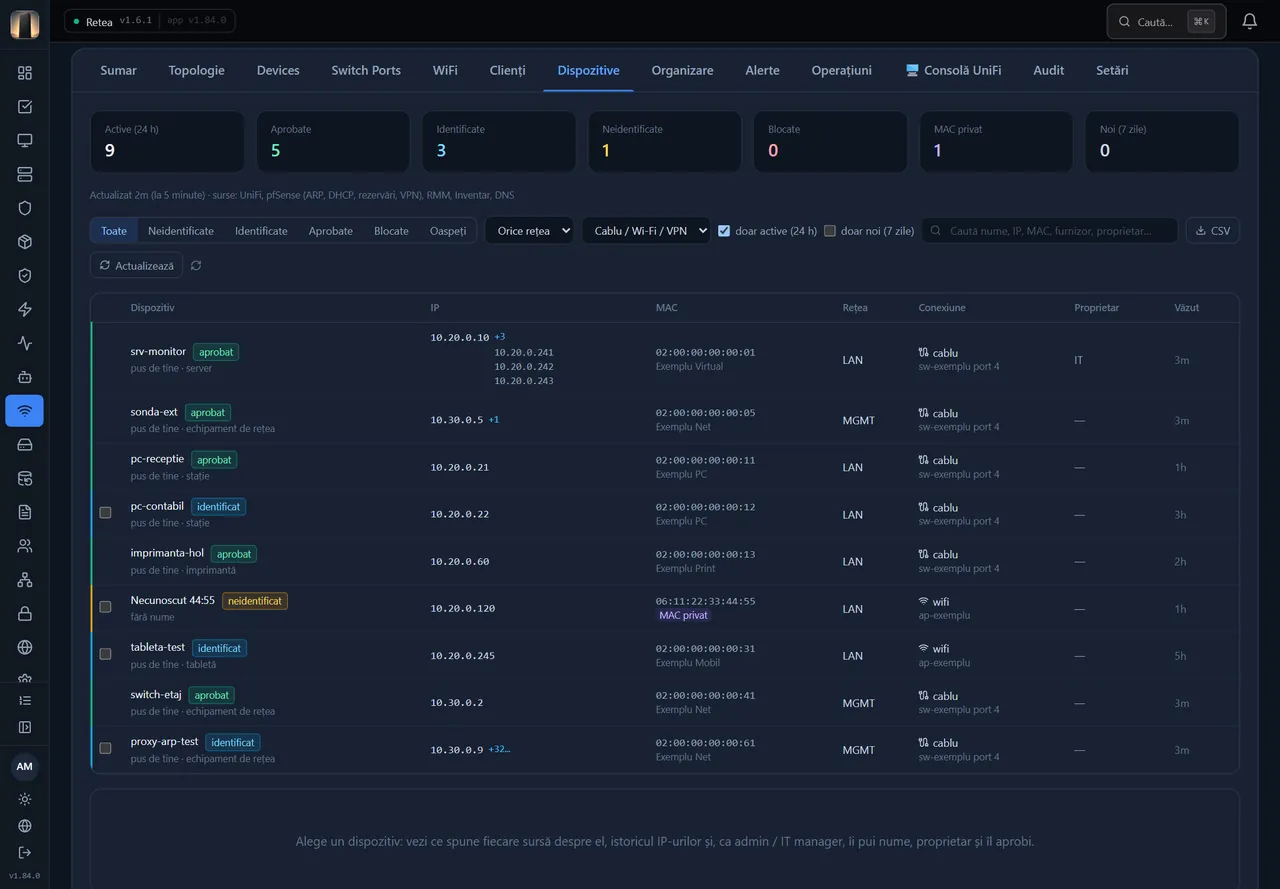
Device registry, IP address plan, topology with racks and patch panels, clients with filters, remote UniFi operations.

Monitoring0.8 · Beta

The company’s applications checked continuously, incidents and uptime, the VMs in Proxmox, the infrastructure map with racks and cabling.

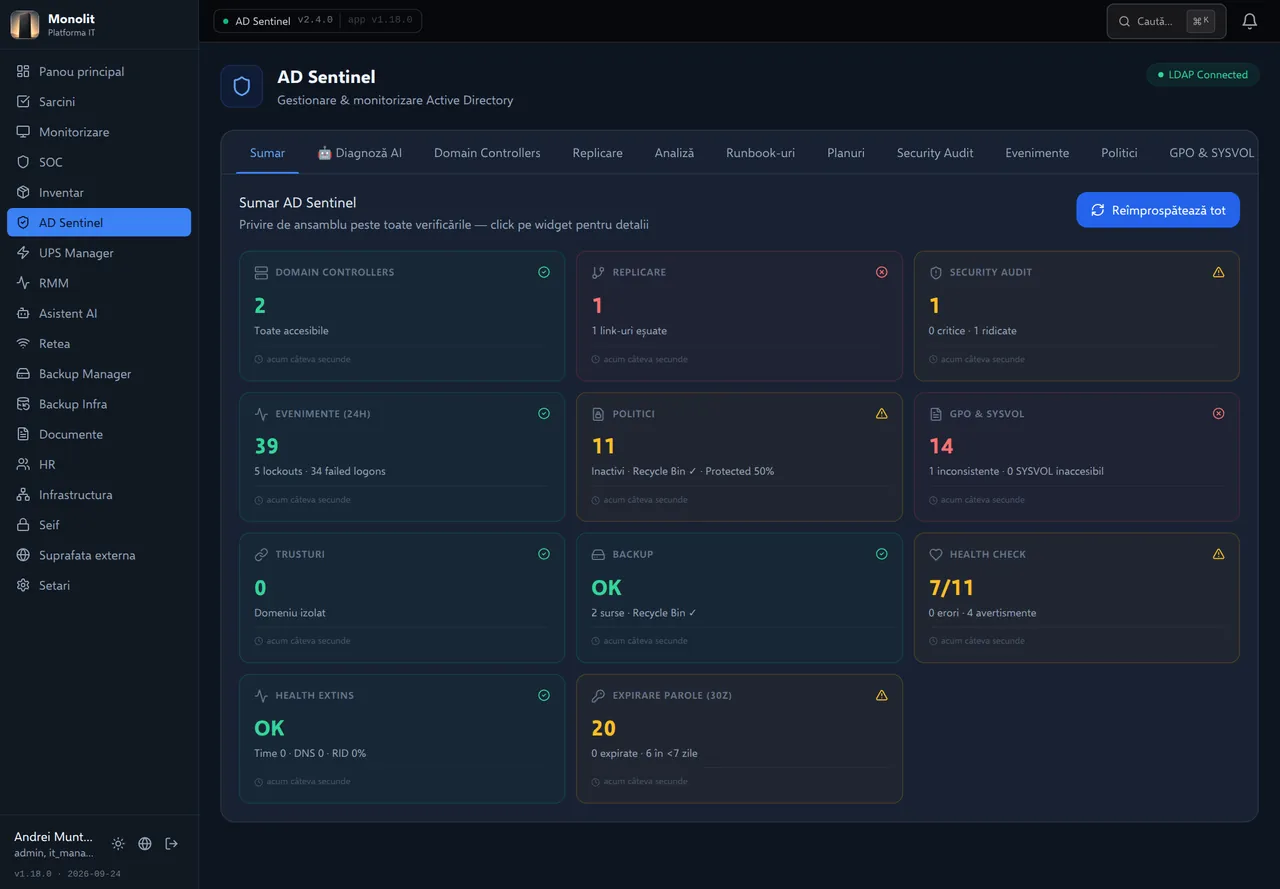
AD Sentinel2.9 · Stable

Domain controller health, replication, users, repair runbooks with pre-checks, service accounts separated by role.

SOC0.40 · Beta

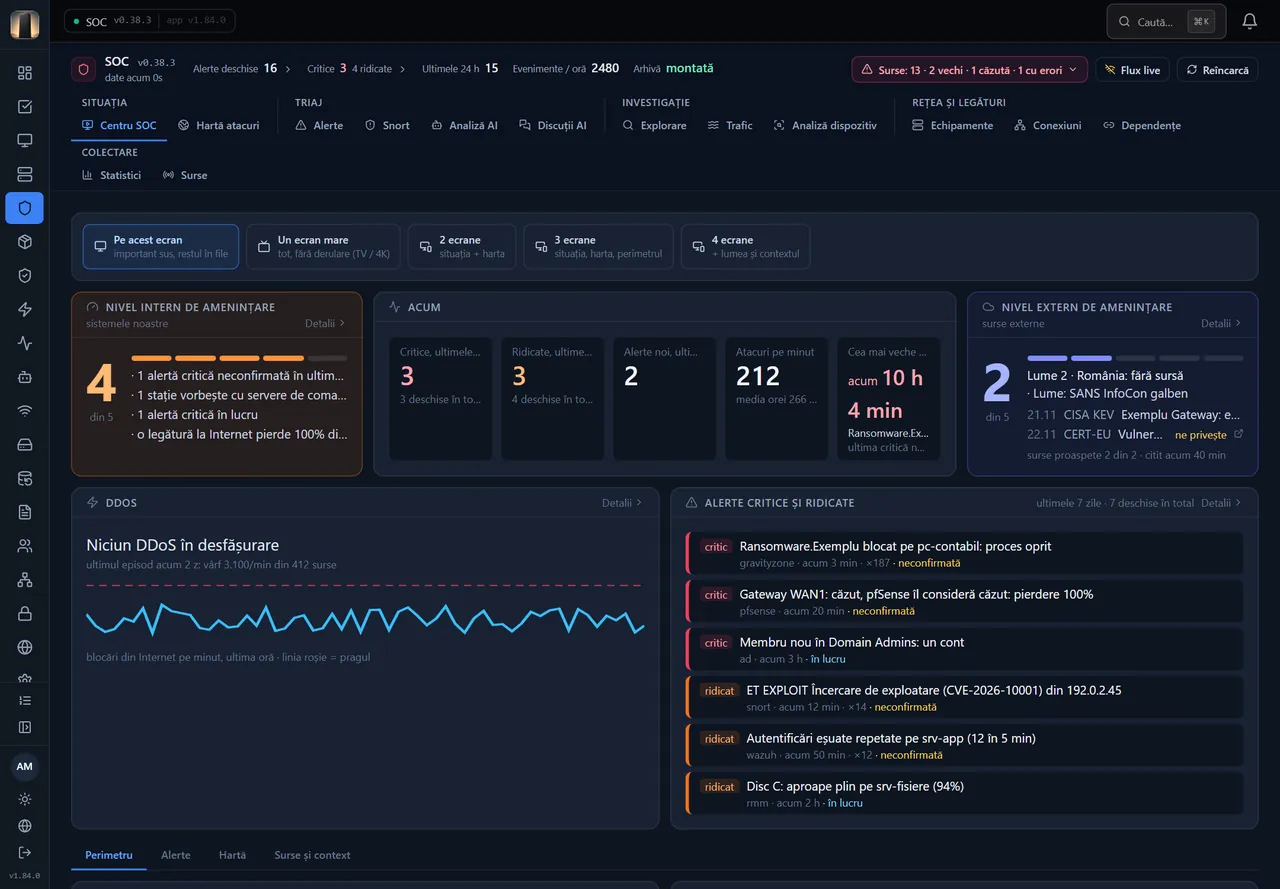
Firewall, IDS, antivirus, Wi-Fi, and Active Directory in a single feed, a SOC wall with the internal and external threat levels, an attack map, suspicious behavior on the network, Internet link health with a report for the provider, and network traffic and an archive on the NAS, with local AI.

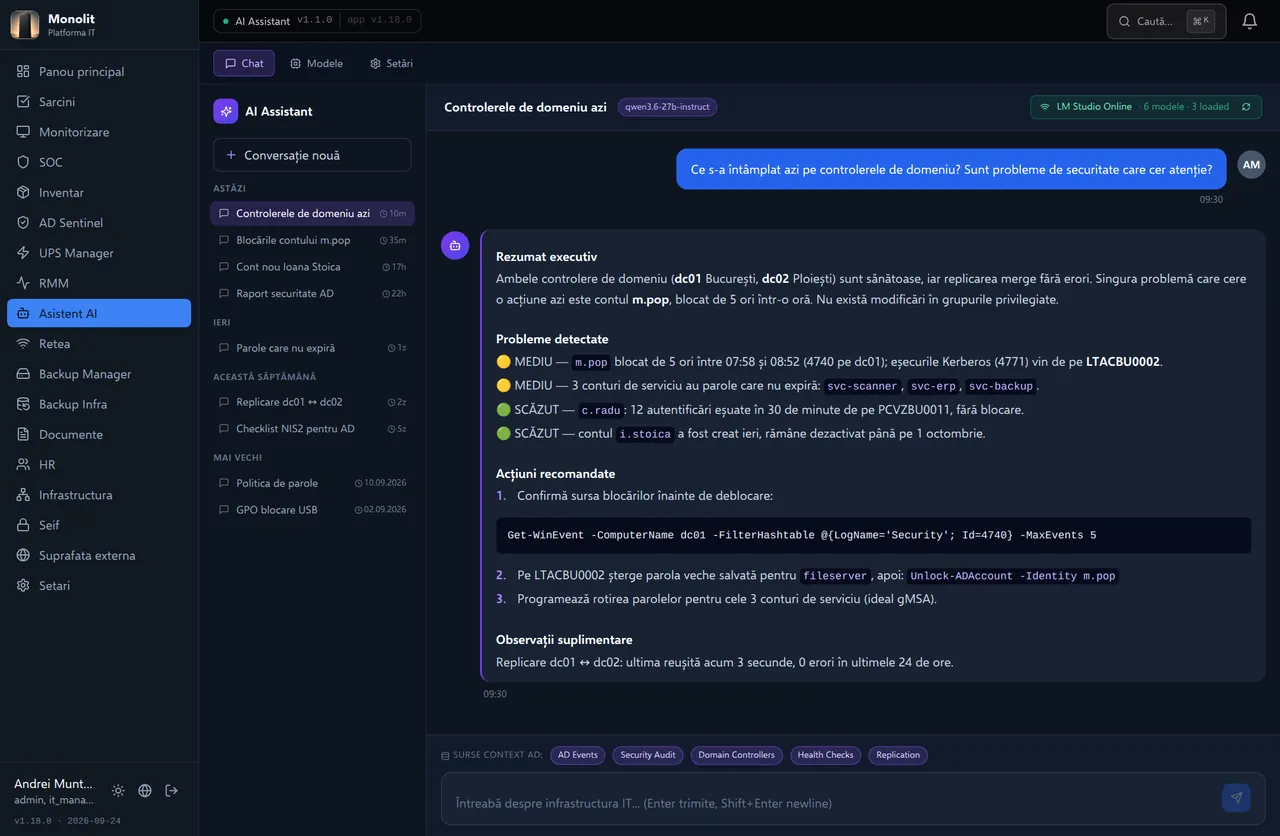
AI Assistant1.12 · Stable

A language model that runs locally: it explains alerts and IDS signatures, summarizes workstation logs, helps troubleshoot errors, analyzes a device’s traffic, and writes the daily summary.

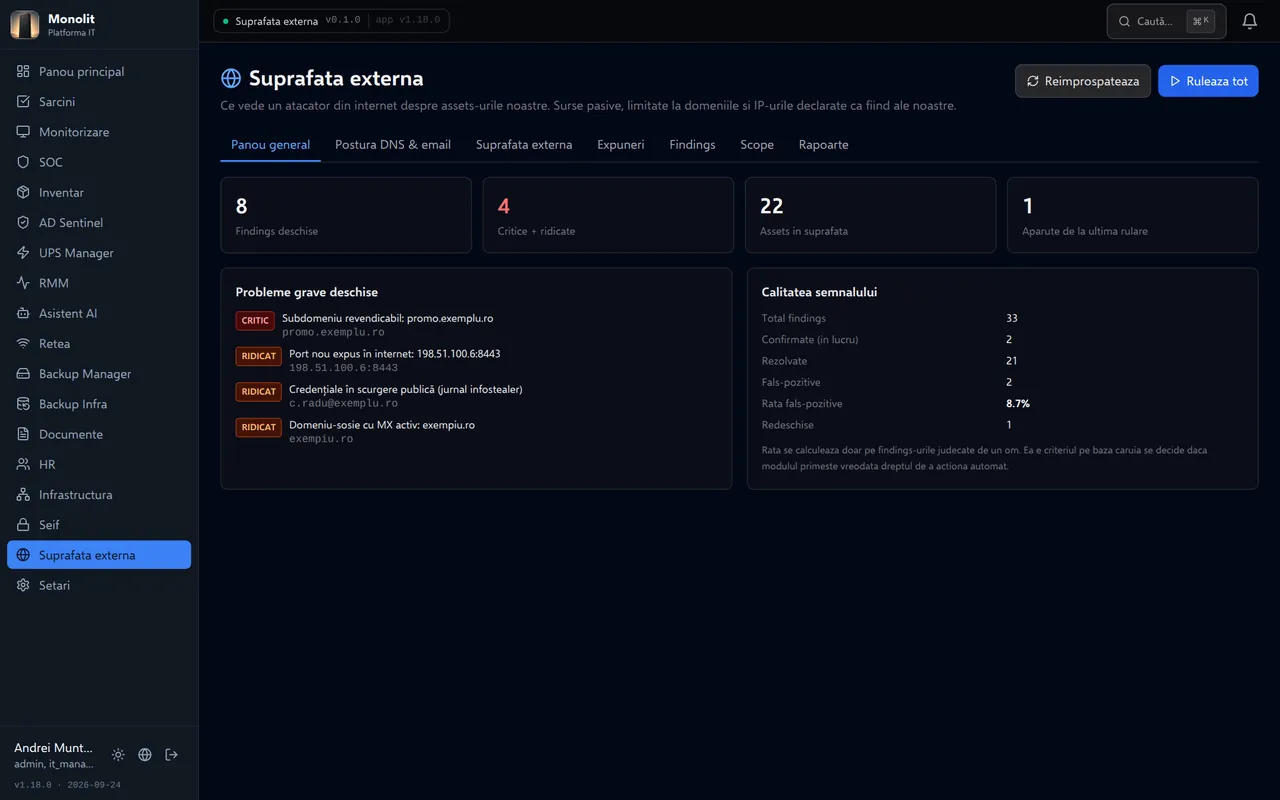
External attack surface0.3 · Pilot

The company as seen from the Internet: SPF, DKIM, DMARC, subdomains open to takeover, lookalike domains, leaked credentials.

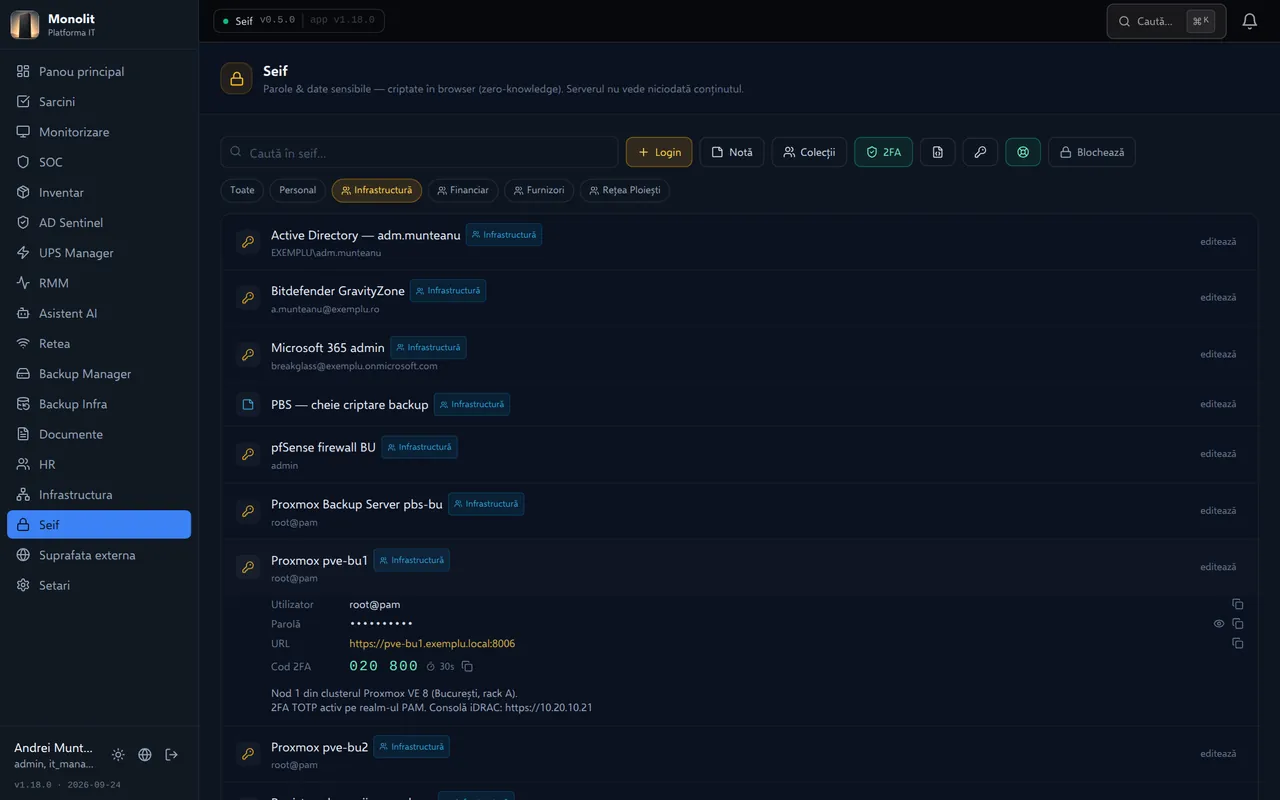
Vault0.6 · Beta

Password manager with end-to-end encryption, team collections, 2FA, recovery with split keys, and a separate vault for module secrets.

Infrastructure Backup1.12 · Stable

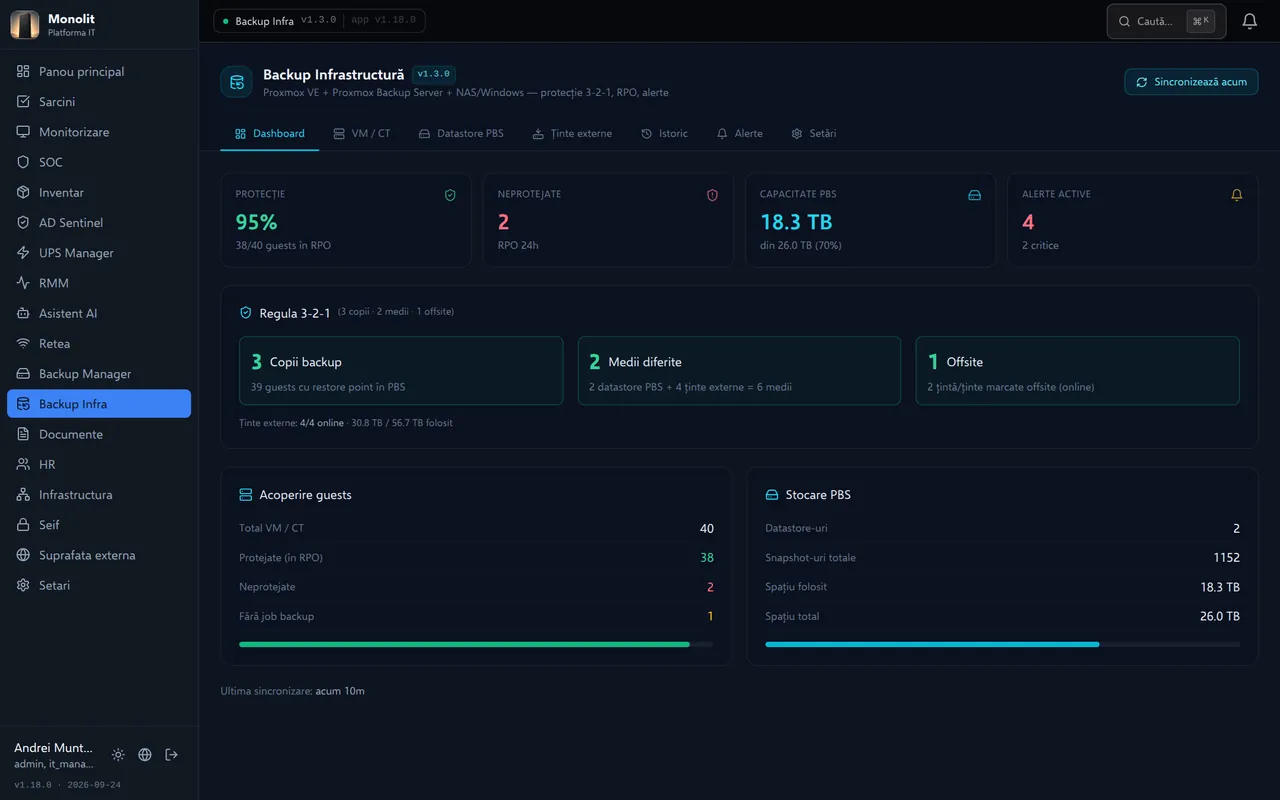
Checks the backup of every VM and server: Proxmox VE and PBS, Veeam, TrueNAS, S3, NAS, Windows, plus the job configuration and the storage that is filling up.

Backup & Recovery1.4 · Beta

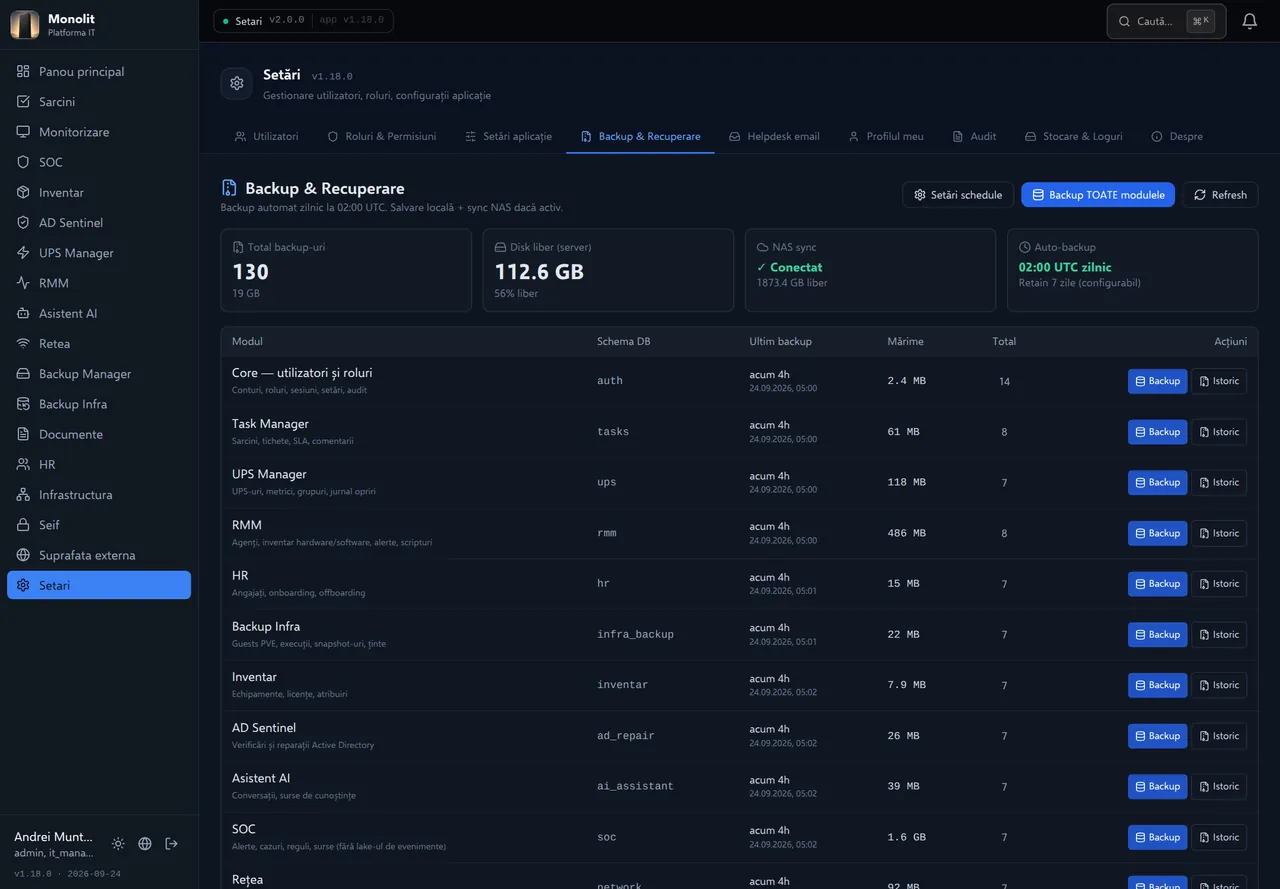
Backup of the platform itself: each module saved on the chosen schedule and verified, an optional copy on a NAS, and a restore that either succeeds completely or changes nothing.

HR1.2 · Stable

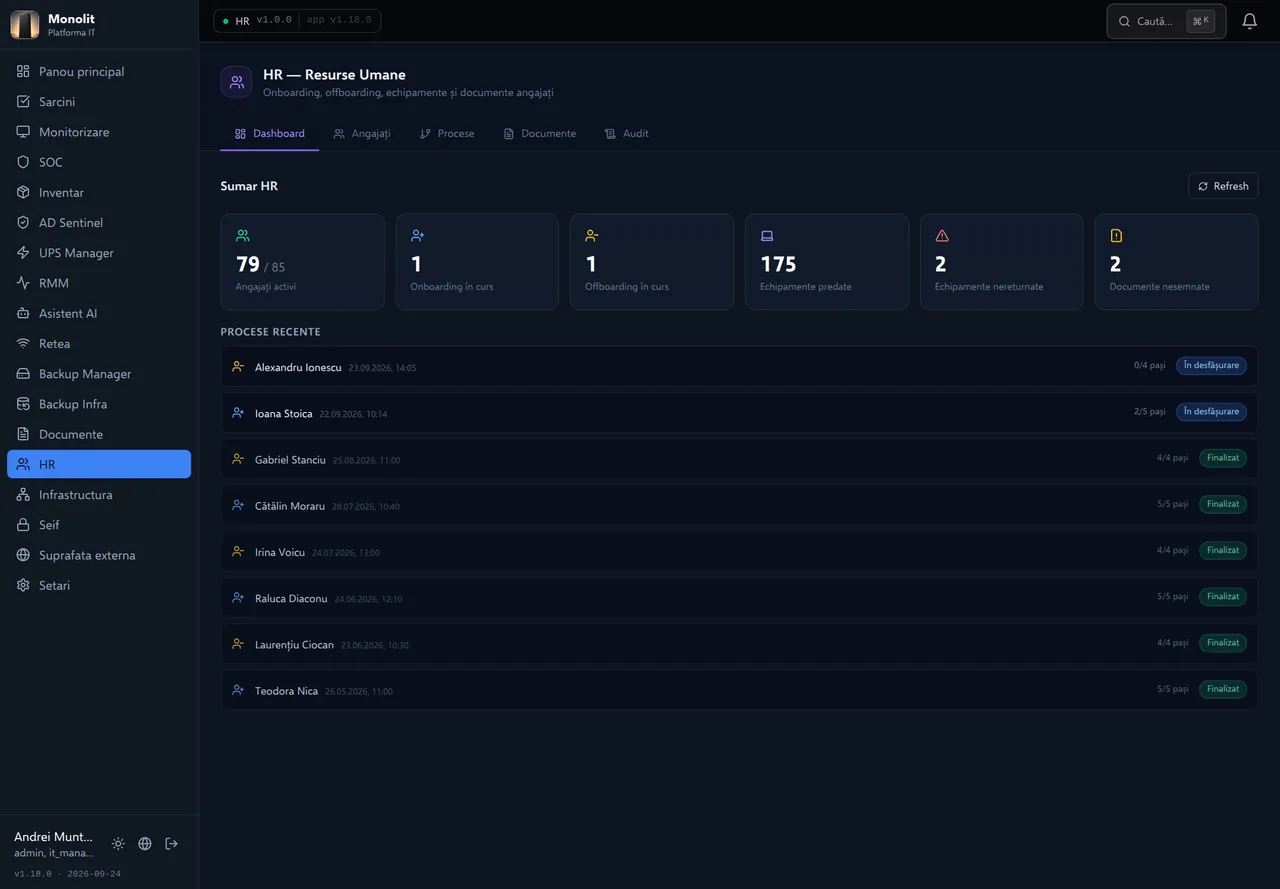
Onboarding and offboarding as step-by-step workflows: equipment from inventory, PDF documents, automatic IT tasks, and an offboarding closes only once access is revoked.

Documents1.6 · Stable

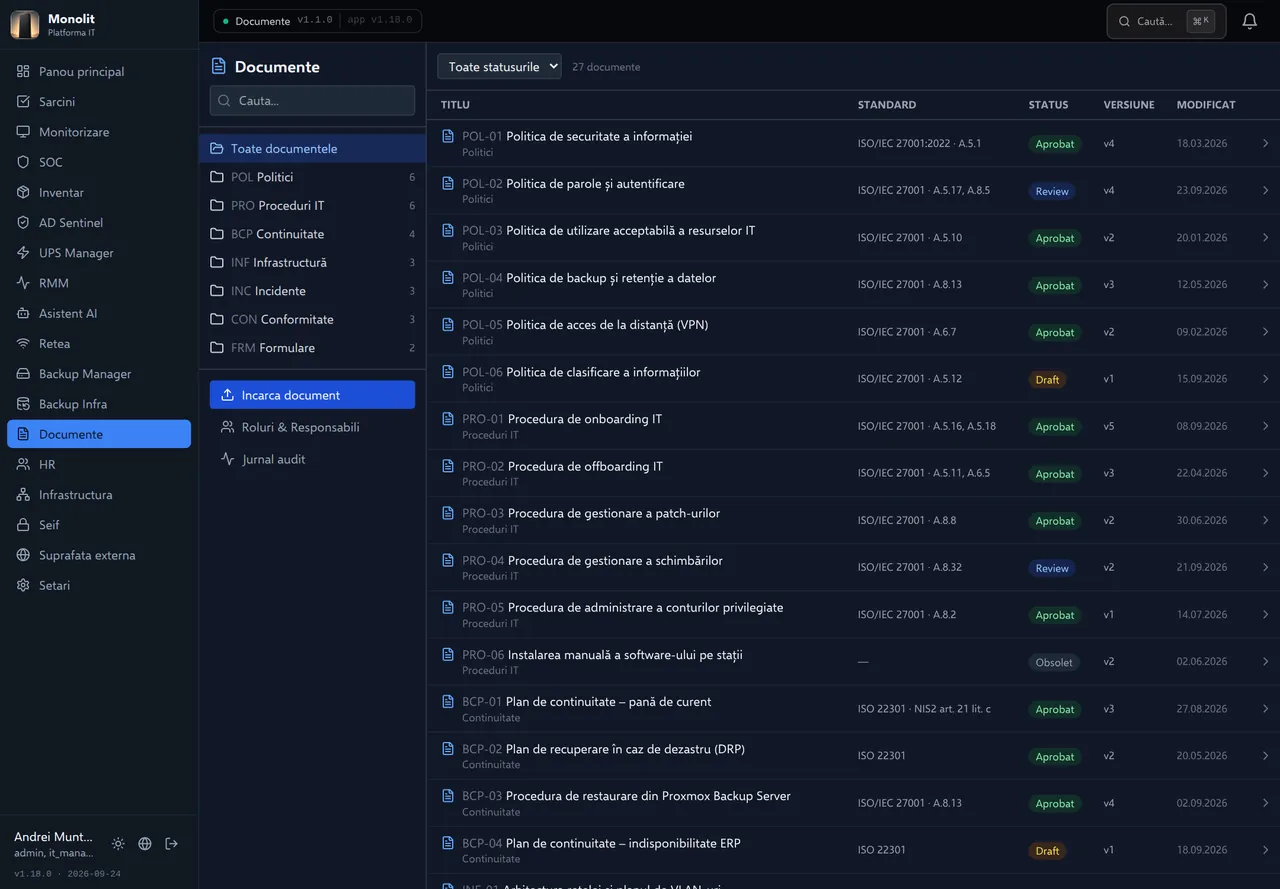
Versioned procedures and policies, with an approval workflow and export, plus compliance with NIS2, ISO 27001, GDPR, and CIS: score, action plan, documents from templates.

Agent-based backup0.1 · Pilot

Workstations and physical computers, Windows and Linux: versioned files, sync, applications (SQL, Active Directory), and the image of physical servers, on a NAS, on PBS, in the cloud, or on USB, in a repository the workstation cannot delete. A component separate from the agent, managed from Backup Manager.

Stable core features complete, usually version 1.0 or higher Beta functional, being extended Pilot first version

Module tour

What the team sees, what the company gains.

Ten modules, each with its own screen. The screenshots below are sketches with sample data, with the labels translated into English; the application interface itself is in Romanian. The module catalog has screenshots from the real application for 15 of the 17 modules (for Monitoring, the screenshots are in preparation, and agent-based backup is described on the Infrastructure Backup page), plus separate descriptions for leadership and for the IT team.

IT operations
Security
Continuity and people

Helpdesk & Task Manager v2.5.0

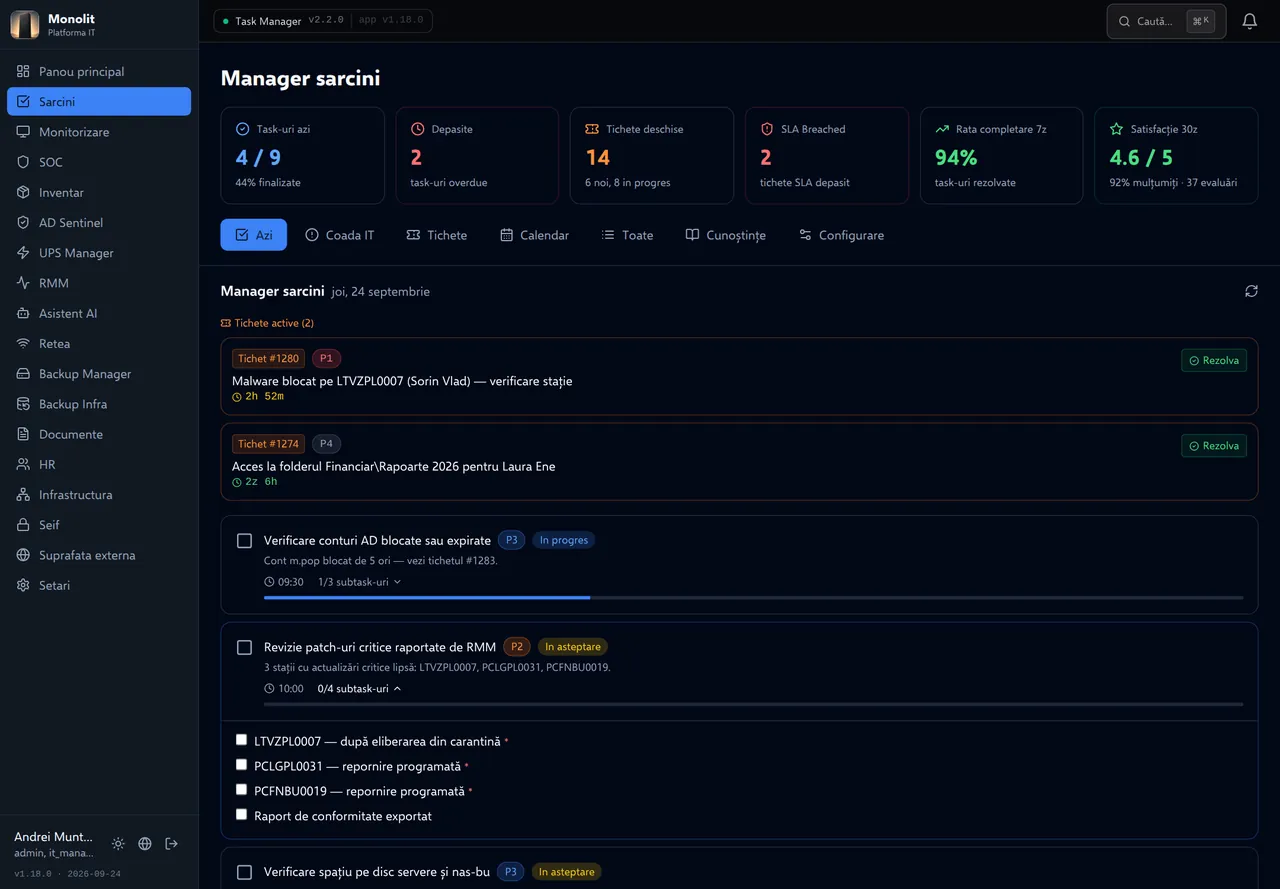
All requests to IT land in a single queue: from the employee portal (even without an account) and from email. When an onboarding or an offboarding is completed, the HR module automatically creates the task for IT, and a failed compliance check becomes a task with one click, from Documents.

  • SLA by priority, P1–P4, with a clock that pauses and resumes while you wait for a reply
  • Team queues, automatic assignment by category, bulk actions
  • Knowledge base and canned responses, replies directly by email, satisfaction ratings
  • Recurring tasks generated from templates: checks, rotations, controls
For leadership

Resolution time and SLA compliance become measured figures, not impressions.

Replaces: a separate helpdesk (Freshservice, Jira Service Management, ServiceDesk Plus).
Module page, with real screenshots

Modules in detail

Each module has its own page, almost all with real screenshots.

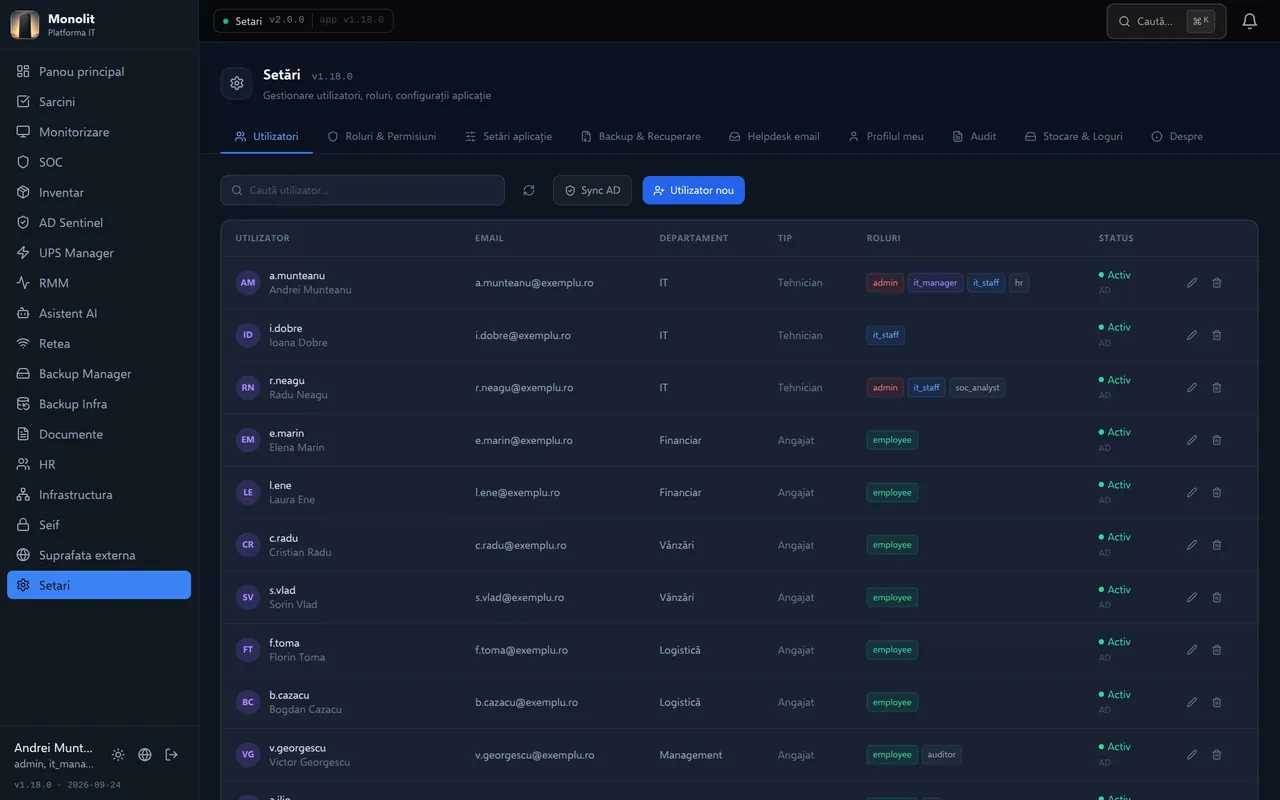
The screenshots come from the Monolit application, running on data from a fictional company; the application interface in them is in Romanian. Each page has two levels of detail: for leadership (what it solves, how the team works with it, what gets measured) and for the IT team (integrations, requirements, roles and control, limitations).

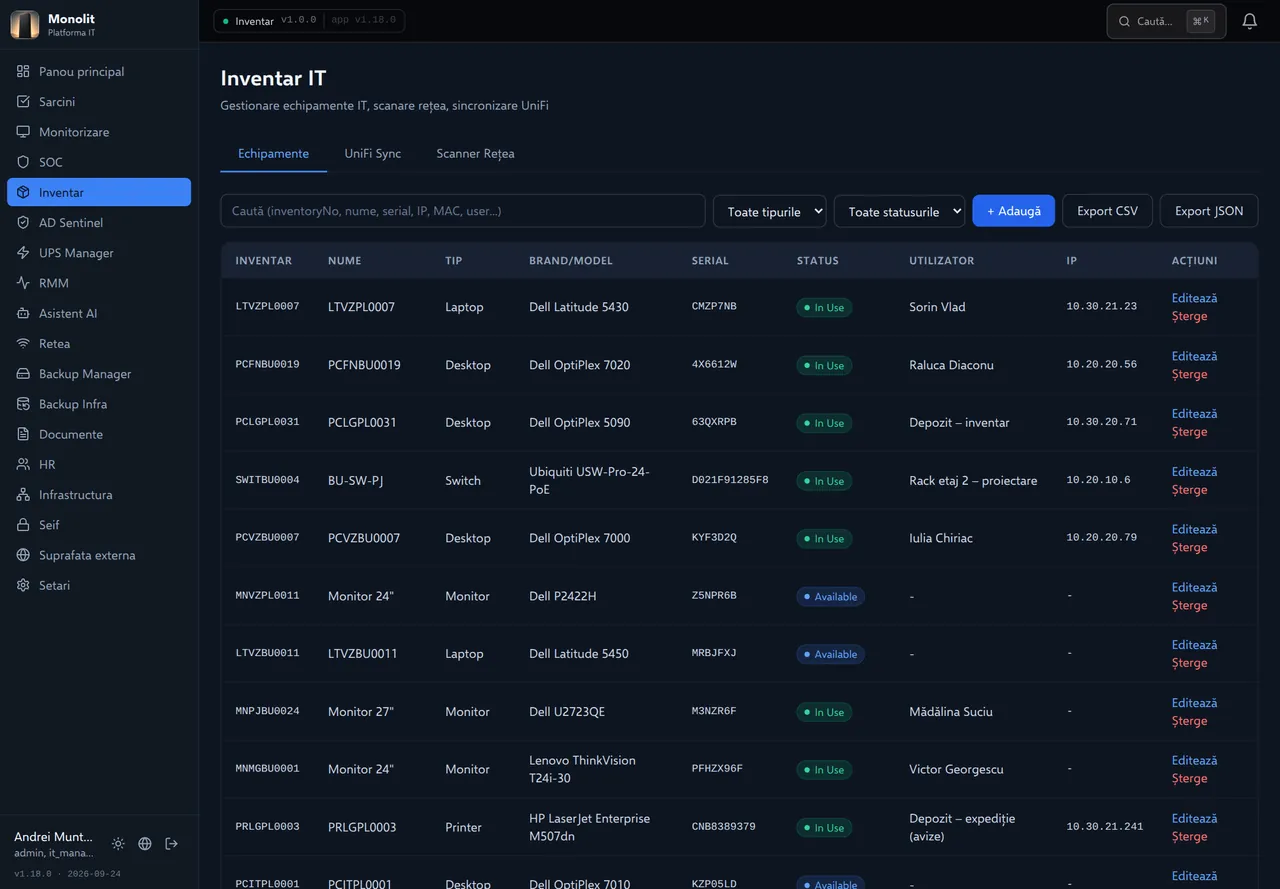
Today’s tasks, generated from templates Helpdesk & Task Manager2.5.0 · Stable Every request to IT goes into a single queue, with measured SLA deadlines and the knowledge base at hand. 2 screenshots · leadership and IT team → Leadership view RMM1.21.7 · Stable The status of every workstation and server, patches, antivirus, logs explained by a local AI, and remote actions, with a digitally signed agent on Windows. 5 screenshots · leadership and IT team → Asset list Inventory1.1.0 · Stable Every piece of equipment has an asset tag, an owner, a location, a rack position, and a warranty, with network scanning and QR labels. 4 screenshots · leadership and IT team → The status of the 6 UPS units UPS Manager1.2.0 · Stable UPS units monitored over SNMP or NUT, with a graceful shutdown of the servers during a power outage. 3 screenshots · leadership and IT team → Device registry Network1.6.1 · Stable Every device on the network identified, the IP address plan, the complete topology, and UniFi operations, across all locations. 4 screenshots · leadership and IT team → Screenshots in preparation Monitoring0.8.2 · Beta The company’s applications and the virtual machines they run on, checked continuously, plus a complete map of the infrastructure, down to the rack and the wall jack. screenshots in preparation · leadership and IT team → SOC Center: the current situation on one screen SOC0.40.0 · Beta Firewall, IDS, network traffic, Active Directory, and antivirus in one place: a SOC wall for the IT room with the internal and external threat levels, the attack map, suspicious behavior on the network, the health of every Internet link with a report for the provider, and explanations from a local AI. 6 screenshots · leadership and IT team → Ask in Romanian, get a structured answer AI Assistant1.12.0 · Stable A language model that runs on a company server and explains alerts, logs, errors, and a device’s traffic, without sending data outside the company. 3 screenshots · leadership and IT team → Health summary AD Sentinel2.9.4 · Stable Active Directory health and repairs through runbooks with pre-checks, with separate accounts for each role (read access without administrator rights) and every session on the domain controllers logged. 5 screenshots · leadership and IT team → Overview External attack surface0.3.0 · Pilot The company as seen from the Internet, the way an attacker sees it: domains, subdomains, email, exposed ports. 4 screenshots · leadership and IT team → The unlocked vault, on the Infrastructure collection Vault0.6.0 · Beta The team’s passwords, encrypted in the browser, and a separate vault for the secrets the modules need, with policy-based access and two-person approval. 4 screenshots · leadership and IT team → 3-2-1 protection and RPO Infrastructure Backup1.12.0 · Stable Automatically checks the backups in Proxmox and Veeam and the storage targets: what is protected, what is left uncovered, and when the space will fill up. Workstations and physical computers are backed up through the agent, and restores are tested automatically every month. 4 screenshots · leadership and IT team → Platform backup, by module Backup & Recovery1.4.0 · Beta Backup of the Monolit platform itself: every module has automatic, verifiable copies on the schedule you choose, kept locally and optionally on a NAS, and a restore either succeeds completely or changes nothing. 2 screenshots · leadership and IT team → HR dashboard HR1.2.0 · Stable Onboarding and offboarding as step-by-step workflows, with equipment from inventory, PDF documents, and automatic IT tasks; an offboarding is completed only after access has been revoked. 4 screenshots · leadership and IT team → Document register Documents1.6.1 · Stable Versioned policies and procedures, with approval and export, plus compliance with NIS2, ISO 27001, GDPR, and CIS: an evidence-based score, an action plan, and automated checks from the platform’s data. 4 screenshots · leadership and IT team → Users synced from Active Directory Platform: users, roles, audit2.6.1 · Stable A single sign-in with revocable sessions, shared roles, the account audit log, and a menu each person can customize, for all 17 modules. 1 screenshot · leadership and IT team →

The full catalog groups the modules into operations, security, continuity, and platform. From any module page you can come back here with “Back to the presentation”.

Open the module catalog

Advanced features

What sets it apart from a monitoring tool.

The features below are usually found only in separate enterprise products. In Monolit they work together and use the same data.

on-premises LLM

AI that stays inside the company

The model runs on a company server. It explains alerts and IDS signatures, interprets the logs of the domain controllers and workstations, helps troubleshoot an error, identifies unknown addresses, analyzes a device’s traffic, and writes the daily summary. Passwords and tokens in the logs are masked before analysis. No log reaches an AI vendor.

human-in-the-loop · 6 roles

The AI recommends, people decide

A patch, a script, an AD runbook, manually shutting down a server, or isolating a workstation all require a decision by a person with the right role. Every decision stays in the log, with the user and the time.

anti-ransomware

An alert at the first sign of ransomware

Anti-ransomware protection on workstations: at the first sign, a critical alert appears on the IT team’s screen, with the workstation and the affected file, and an administrator can isolate the workstation from the network directly from the alert window.

UPS units with SNMP or NUT

Graceful shutdown during a power outage

Each server has its own runtime threshold, whether it is a Windows or Linux machine, a Proxmox host, or a physical server. Each one shuts down only once, even if Monolit restarts during the outage. When power returns, the selected servers start up again automatically, and every event stays in the log.

check · confirm

Verified AD runbooks

Every repair in the domain runs only after automatic pre-checks, with exactly the script that was checked. At medium risk you type the controller’s name, at high risk a dry run is mandatory, and every session on a controller stays in the log.

NIS2 · ISO 27001 · GDPR · CIS

Compliance measured, not declared

For each standard: a score, the missing requirements, the action plan, and the missing documents, generated from templates. Some requirements are checked automatically from the platform’s data: antivirus, patches, backup, SOC sources, inactive accounts. Plus executive and ISO 27001 PDF reports.

E2E · two-person approval

A zero-knowledge vault for people

People’s passwords are encrypted in the browser, and emergency recovery requires several administrators at once. Module secrets are kept separately and are protected too, and deleting them or changing access requires the approval of two administrators.

SOC Center · discreet mode

SOC wall on 1–4 screens

The security status on one monitor or split across 2–4 large screens in the IT room: the internal and the external threat level, each from 1 to 5, the oldest critical alert nobody has taken ownership of, the serious alerts, a tile for each Internet link, the attack map, and public threat bulletins. The wall screens run without an account, using a key that can be revoked, and discreet mode hides the details when visitors come in.

network traffic · audit

Who accessed an address

From the traffic seen by the firewall, Monolit shows which workstation talked to an address or a domain, when, and how much, and flags the workstations that talk to addresses on public attacker lists. This is personal data: only administrators and the IT manager can see it, and every search stays in the log.

single status · probes · ISP report

Internet links, measured

Each connection has a single status and a history, and a missing measurement shows up as missing, not as a link without problems. The details, from the probes to the report for the provider, are in the next section.

observation · issue card · approval

Behavior tracked, problems with next steps

Ten detections track the behavior of the equipment over time and start in observation mode. Any problem opens on an issue card with the resolution steps, and an action started from the card requires a person’s approval. The details are in the next section.

agent-based backup

Backup the workstation cannot delete

Workstations and physical computers without any other backup are backed up by a separate component, installed by the Monolit agent: versioned, encrypted files, in a repository on the NAS that the workstation itself cannot delete. Ransomware on the workstation cannot destroy the copies as well. Restores are started by administrators and the IT manager and are audited, and employees can request one for their own computer; deleting copies requires the approval of a second administrator. Every month, Monolit automatically tests restoring a virtual machine.

one row per device

Device registry

Data from the Wi-Fi controller, the firewall, the RMM agent, the inventory, and DNS is merged into a single registry, with name, owner, and status. A new, unidentified device triggers an alert, and the history shows who had an IP address at a given time. A device with several addresses appears only once.

archive on the NAS

A long log history, on the company’s NAS

Events are archived on the company’s NAS. How much history you keep depends only on the space on the NAS.

modular

Independent modules

Each module is enabled one at a time and updated separately, and a new module is added according to stable integration rules, without affecting the functions of the others. The company starts with only what it needs.

~4 MB · signed on Windows

A lightweight, signed agent

It puts little load on the workstation, and the memory and CPU it uses are visible on each workstation’s page. It updates gradually and, on Windows, accepts only signed versions. Built-in remote control and a system tray icon. Windows and Linux; on Linux, without the Windows digital signature and without patch management.

bulk installation

Discovery and bulk installation

Scans the network, shows which workstations don’t have the agent and installs it on dozens of computers in a single operation.

multi-site

Designed for multiple sites

Inventory equipment and UPS units carry their location, and the network topology is organized by building and rack. All sites are managed from the same application.
SOC in detail

What the SOC sees beyond alerts.

Internet links measured and proven, suspicious behavior on the network, and a SOC organized around how the team works. Features that need configuration on the firewall or a decision by the company are off by default and say so on screen.

SOC · Connections

The quality of each Internet connection, with evidence for the provider

Each Internet link has a single status, the same on the wall, in alerts, and in reports, and a history: outages and degradations, with their start and end, availability, latency, packet loss, and traffic against the contracted speed. When a connection performs poorly, the IT manager downloads the report for the provider, as a PDF with verifiable CSV tables. The report uses a conservative method that is hard to dispute: it says the link was below the threshold in the contract only when the data shows it even in the calculation most favorable to the provider.

For IT: when the firewall does not respond, the value shows as “not read”, not as “no loss”. The history is kept for more than a year, and the reports that were sent stay on the server, verifiable. The report contains no personal names, accounts, or internal addresses, and it goes into the audit log.

Internet links, on the SOC page
SOC · Connections

One chart per link, from one minute to one year

The status, latency, jitter, packet loss, availability, and traffic of each link sit on the same chart, with events marked on top: outages, alerts, a change of public address. All links share the same time axis, so an outage they have in common is visible immediately.

For IT: gray areas are unmeasured time, never zero; over long intervals, the chart picks its own resolution and says why.

SOC · probes

Where the outage is: on our side, at the provider, or further out

The firewall sees only the beginning of the path to the Internet. The Monolit probes also measure, on each link, the path beyond the first router, and they tell where the problem is: on the line, at the provider, on the Internet, or on our side.

For IT: off by default; they are turned on after configuration on the Monolit server and on the firewall. A measurement that cannot be proven shows as “not read”, not as “OK”.

SOC · attacks on links

What hits each link

Firewall blocks and IDS alerts coming from the Internet are counted for each link, by hour and by type. On the wall, each link has its own tile, and a DDoS attack lights up only the link being hit. The report for the provider also answers the question “were you under attack at the time?”

For IT: an attack that cannot be tied to a link with certainty is shown separately, with no guessing, and the figures match the attack map.

SOC · issue card

Every problem has its own card

An alert, a group of alerts, an IDS signature, or a link that went down all open on the same card: what it is, where it comes from, why it matters, how to fix it, and which workstations are affected, with a conversation with the local AI alongside. Old critical problems and DNS that bypasses the company’s filters get concrete resolution steps.

For IT: where Monolit has the tool (AD Sentinel, RMM, GravityZone), the step is a button, with a person’s approval; nothing runs automatically.

SOC · network behavior

Suspicious behavior, not just isolated alerts

Ten detections track the behavior of each device over time: programs “phoning home”, data sent far above normal, important addresses taken over by another device, rogue DHCP servers, attacks on accounts, unapproved access tools, cryptocurrency mining, equipment connecting to new destinations, and services newly exposed to the Internet. Each one starts in observation mode. The ones that raise alerts do so only after the IT team has confirmed that false alarms are rare, and the rest remain findings for the IT team. Nothing is blocked or closed automatically.

For IT: the per-workstation analysis starts only after the company confirms that its privacy notice covers traffic analysis; the data is pseudonymized and deleted after 30 days at most. Only administrators and the IT manager see the full finding, and every view is audited. The alert visible to the rest of the IT team never shows the account or the owner. Only the technical data of the finding reaches the AI, with no personal names.

The ten detections, on the SOC page
SOC · interface

A SOC organized around how the team works

The tabs sit in five groups: Situation, Triage, Investigation, Network and links, Collection. SOC Center is the first page and shows how long the oldest critical alert nobody has taken ownership of has been waiting. Alerts open in a side panel, alerts of the same kind are grouped, one click takes ownership of them, and the status of the sources sits in a single badge.

For IT: each role sees only its own tabs, and a source that has been silent for too long is visible from the header.

SOC · statistics

Peaks that occur together

“Hourly trend” puts several series on the same chart (for example firewall blocks, IDS alerts, and Active Directory events) and marks the hours in which several signals peak at the same time. Each of those hours leads directly to its events.

For IT: hours without data appear as gaps, not as zero, and when overlaps are marked, series that count the same events count only once.

SOC · less noise

Fewer pointless alerts

Routine Windows noise no longer becomes an alert. CISA security advisories for specialized equipment come from an official source and are verified before they are displayed.

For IT: the same event arriving from several sources is neither counted twice nor hidden.

These stay off until they are configured or until the company decides: the probes beyond the first router, the external signals about providers (IODA, status pages), and the per-workstation behavior analysis. Each screen says “off” or “not read”, not “OK”.

Market positioning

Between single-purpose cloud tools and enterprise suites.

The market offers excellent products, each in its own domain. Small and mid-sized companies end up working with five or six products that don’t talk to each other, with their data in each vendor’s cloud.

Positioning map Horizontal axis: where the data stays, from the vendor’s cloud to the company’s server. Vertical axis: coverage, from a single domain to unified IT operations and security. Monolit is in the top right corner. Vendor’s cloud Company’s server Where the data stays → A single domain Unified IT + security ServiceNow Atera NinjaOne Microsoft Sentinel Freshservice Jira Service Mgmt ManageEngine Wazuh (self-hosted) Eaton IPM Monolit
Qualitative positioning, based on the delivery model and functional scope each product publishes. ManageEngine: several separate products, also available on-premises. A self-hosted Wazuh can also be a source for the Monolit SOC (optional integration).

Monolit does not aim to beat every RMM or every SIEM in its own domain. It is the platform that brings IT operations and security together in one local workflow.

Who it is for

Companies with 30–250 workstations, an in-house IT team of 1–10 people, their own or hybrid infrastructure, one or more locations.

Deployment

On-premises by design. Competitors are generally cloud-first; Monolit runs on a company VM.

Adaptability

High. Monolit adapts to the company’s processes, not the other way around. New modules are added according to stable integration rules, without affecting the functions of the existing ones.

Growth

Grows with the company. New workstations, people, and sites are added to the same platform, with the same rules and the same dashboard.

Data

In the company’s infrastructure. Logs, inventory, passwords, and the AI context stay on your own servers.

NeedTypical solutions on the marketTheir public priceIn Monolit
Workstation monitoring and patchingNinjaOne, Atera, ManageEngine Endpoint Central$1.50–3.75 / endpoint / monthRMM
Helpdesk and SLAFreshservice, Jira Service Management, ServiceDesk Plus$19 / $49 / $99 per agent / monthHelpdesk & Task Manager
Log collection and correlationWazuh Cloud, Microsoft Sentinelfrom $571 / month (≤ 100 agents)SOC + AI Assistant (can also read a self-hosted Wazuh, optional)
Password manager for teamsBitwarden Teams, 1Password Business$4 / user / monthVault
UPS managementEaton IPM, Schneider EcoStruxure IT$1,290 (15 nodes), licenseUPS Manager
Application and VM monitoringZabbix, PRTG, Uptime Kumafree (open source) or a license based on the number of sensorsMonitoring
NIS2 / ISO 27001 compliance and audit evidenceCommercial GRC platforms, specialist consultingby quoteDocuments → Compliance
External attack surfaceCommercial EASM servicesby quoteExternal attack surface
Antivirus / EDRBitdefender GravityZone, Defender, CrowdStrike$3–20 / device / monthStays in place. Monolit integrates it and correlates its alerts.

The prices are those of the solutions on the market: from the Monolit positioning analysis (April 30, 2026) and, for Bitwarden, from the official page (checked September 24, 2026). They vary with volume, contract, and region.

Honesty

What Monolit is not

Overstated promises in security do more harm than a missing feature. The limits are clear from the start.

  • It is not an MDR service with 24/7 security analysts. It is an in-house, AI-assisted SOC, with a human in the loop.
  • It does not replace the antivirus, the EDR, or the firewall. It reads them, correlates them, and turns their alerts into actions.
  • It does not decide critical actions on its own. It runs them automatically only under rules a person has enabled in advance, such as the graceful shutdown of the servers during a power outage. Otherwise, Monolit prepares the action and a person approves it; the approval is audited.
  • It is not ServiceNow. It is built for small and mid-sized IT teams, with on-site infrastructure.

Benefits

Where the benefits come from and what they are worth to your company.

The benefits come from four sources. The first three go into the calculation below. The fourth, avoided risk, is the largest, but we don’t put a number on it.

Licenses you no longer buy

RMM, helpdesk, log collection, passwords, and UPS: the same functions, without five separate contracts with other vendors.

IT time recovered

Patches approved in bulk, scripts, generated reports, onboarding with IT tasks created automatically, compliance evidence collected from the platform: hours moved from routine work to projects.

Downtime avoided

Graceful shutdown during power outages, backups checked daily, a full disk flagged before it stops a server.

Risk avoided

Ransomware caught at the first workstation it hits, NIS2 fines, and lost equipment or lingering access avoided. Hard to estimate, but decisive.

Organization
IT team time
Downtime
Licenses you no longer buy
Benefits per year—from other vendors’ licenses, recovered IT time, and avoided downtime
—benefits over 3 years
—IT work hours recovered per year
—downtime hours avoided per year

The default values are an example for a company with 100 workstations, not your figures. Replace them with your real data. The license prices are public benchmarks from other vendors, in USD, converted at the rate above (1 EUR ≈ 1.136 USD, September 24, 2026). Team time is calculated over 46 working weeks per year. Avoided risk is not included in the calculation.

NIS2 in Romania

Leadership is personally accountable.

Emergency Ordinance (OUG) 155/2024, approved by Law 124/2025, transposes the NIS2 Directive into Romanian law. Members of the management body approve the security measures, oversee them, and are accountable for failing to comply. Monolit produces the evidence (audit log, reports, incident history, backup and patch status) and measures, requirement by requirement, how close the company is to the measures NIS2 requires.

€10M
or 2% of global annual turnover: the maximum fine for essential entities
€7M
or 1.4% of turnover: the maximum fine for important entities
24 h · 72 h
early warning (24 h) and incident notification (72 h) for a significant incident; a final report no later than one month after the notification

Adoption

Four stages. Each one delivers value before the next one begins.

The modules are independent, so no big migration is needed. You start with today’s most costly problem.

FoundationCore · Dashboard · Helpdesk · Inventory

All requests to IT and all equipment, in one place. The first figures for leadership.

OperationsRMM · Monitoring · UPS Manager · Network · Infrastructure Backup

Visibility and action across the whole infrastructure: workstations, applications, network, power, backup.

People, identity, and complianceAD Sentinel · HR · Documents · Vault

Controlled access, versioned procedures, measured NIS2 and ISO 27001 compliance, protected passwords, offboarding with no loose ends.

AI-assisted securitySOC · AI Assistant · External attack surface

Explained and prioritized alerts, the attack map, each workstation’s traffic, the health of the Internet links. Actions require a person’s approval.

Stages 1–3Monolit IT Manager

The operational platform for the in-house IT team, without the SOC component.

Stage 4Monolit Shield AI

The security layer: SOC, AI triage, correlation, network traffic, the Internet links with the report for the provider, reports. Each problem has its own card, with the resolution steps and, where Monolit has the tool, a button to the existing procedure, with approval. Nothing runs automatically.

All stagesMonolit Complete

The whole suite, with all modules integrated and a single leadership dashboard.

Leadership questions

Straight answers.

Where is our data?

On the company’s own server: an Ubuntu virtual machine with a SQL Server database, no cloud required. The AI runs on a company server. Outbound connections exist only for the integrations you choose (for example the GravityZone console or Teams notifications), for the external surface checks, which are logged, and for downloading public reputation lists, IDS rules, the geolocation database, and security bulletins. These are downloads only: no company data leaves. The one exception is the QR label in Inventory: the image is generated by a public service, to which the browser sends the data on the label (asset tag, model, serial number, department, location), without the person the equipment is assigned to. Two features, off by default, connect to the Internet only if you turn them on. The first is the probes that measure the Internet links, with test packets that carry no company data. The second is checking the providers’ status pages and the IODA public outage observatory. A safeguard prevents the company’s addresses, domains, or name from leaving.

Does it replace the antivirus or the firewall?

No. Monolit reads what pfSense, Snort, GravityZone, and, optionally, a self-hosted Wazuh report, correlates the signals, and turns them into prioritized, explained alerts. Endpoint protection and the firewall stay in place.

What happens if the person who built it leaves?

Each module is documented, and its connection to the rest of the platform is checked with dedicated tools at every change. There are also installation procedures and a written disaster recovery plan, with a restore exercise. Dependence on people remains the main risk; a second trained administrator reduces it.

Can the AI make decisions on its own?

No. The AI explains, summarizes, and recommends. Any sensitive action requires a person’s confirmation. The AI’s answer is kept, and who asked for the analysis and what the user decided stay in the audit log. The automatic verification of SOC alerts runs as a pilot, in observation mode only: it closes nothing, and its results are compared with the team’s decisions before any next step. The network behavior detections start the same way, in observation. The ones that raise alerts do so only after calibration, and none of them blocks or closes anything automatically.

How do we measure the results?

Through metrics that Monolit calculates automatically from day-to-day data:

tickets past SLAaverage resolution timerequester satisfactionworkstations with up-to-date patchessystems without a valid backupopen critical alertsInternet link availabilitycompliance score per standardunreturned equipment

How long does adoption take?

Each module is enabled independently, so the first result comes from the first stage, without waiting for the whole platform. The order is chosen based on today’s most costly problem.

Next step

See Monolit in a scenario close to your company’s.

In the demo we discuss which modules bring benefits right away, in what order they can be adopted, and what infrastructure is needed. Monolit is developed and implemented by TomasNet.